Model Settings
These settings configure the perception engine that is processing input from the video sensor and providing output on the model topics.
Tip
These values are stored in the /etc/default/model file on the device and can be hand-edited.
Settings page out of sync
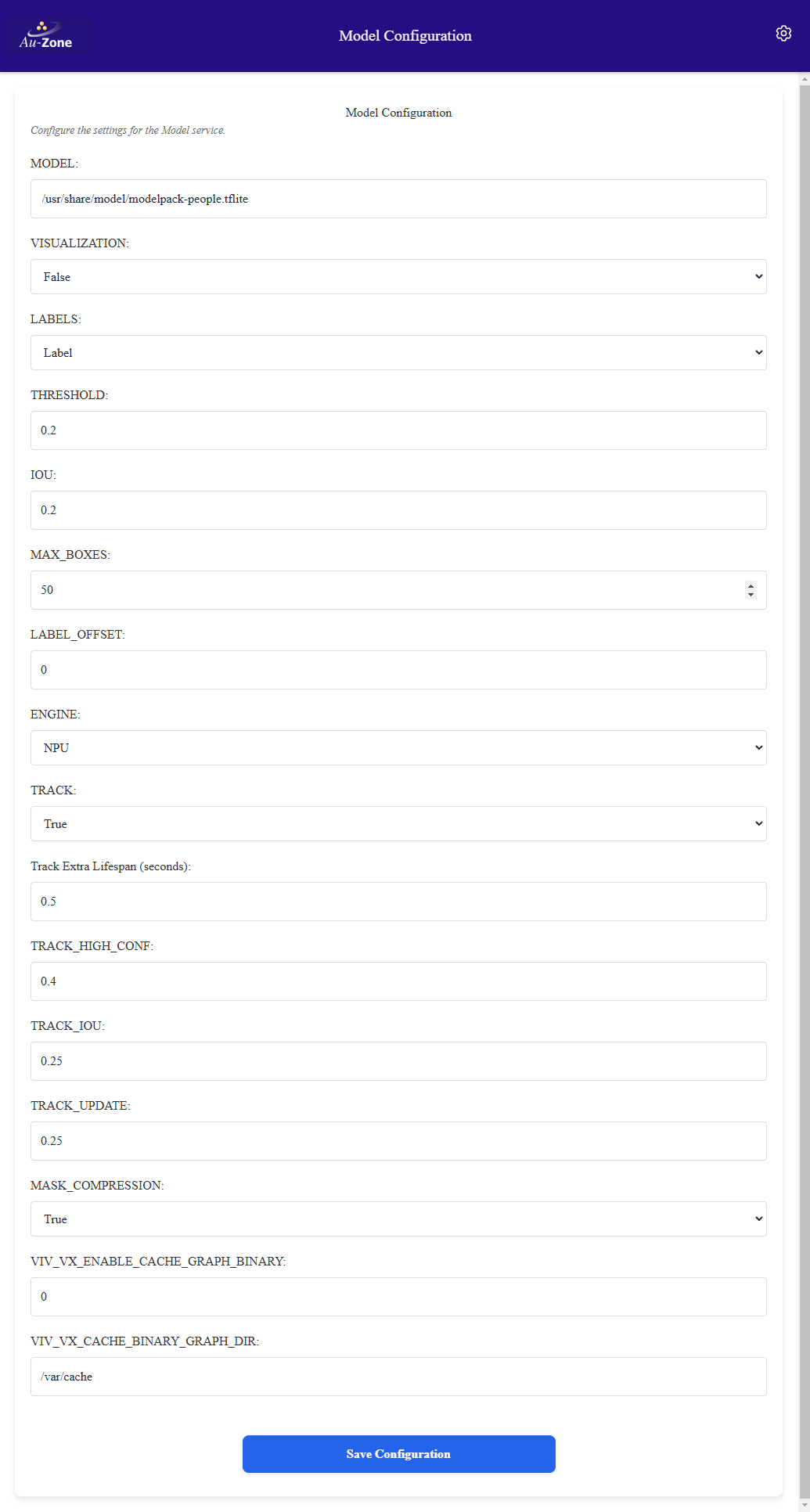
The Model Settings page of the Web UI in this release still lists settings from the previous Model service, such as ENGINE, MASK_COMPRESSION, TRACK_HIGH_CONF, and the VIV_VX graph cache options, which the current service ignores, and does not show the newer DELEGATE, TRACK_SCORE, CLASSES, and topic settings. The settings described on this page are the keys accepted by the Model service in /etc/default/model. Edit the file directly when a setting is missing from the page. Refer to Known Issues.
Model
A model is required for the model service. This can be a detection model, a segmentation model, or a model providing both. Stored as MODEL, the service does not start without it. By default the Maivin and Raivin run the EdgeFirst Model Zoo YOLOv8n INT8 detection model installed under /usr/share/edgefirst/modelzoo/.
| Model | Detection Boxes? | Segmentation Masks? | Default? |
|---|---|---|---|
/usr/share/edgefirst/modelzoo/yolov8n-det-int8-smart.tflite |
Models trained in EdgeFirst Studio, ModelPack or Ultralytics, are deployed by uploading them to the device and pointing this setting at the uploaded file, for example /home/torizon/mymodel.tflite. The service reads the model task, labels, and decoder configuration from the EdgeFirst configuration embedded in the model.
EdgeFirst Config Override
Stored as EDGEFIRST_CONFIG, an optional path to an EdgeFirst configuration file in YAML or JSON that overrides the configuration embedded in the model or supplies one when the model has none. Leave empty to use the model's built-in configuration.
SSD Model
Stored as SSD_MODEL and false by default, enables SSD decoding for SSD-style detection models without an embedded EdgeFirst configuration.
Delegate
The model can be run on the NPU or on the CPU. Stored as DELEGATE, the path to the TensorFlow Lite delegate library. On the i.MX 8M Plus the NPU is selected with /usr/lib/libvx_delegate.so, leave empty for CPU-only inference. Model Zoo models compiled for the i.MX 95 Neutron NPU use /usr/lib/libneutron_delegate.so.
OpenVX Graph Caching
The first load of a model on the NPU compiles the OpenVX graph which can take a minute. The VX delegate caches the compiled graph and later loads are fast. The caching is controlled by the driver environment variables VIV_VX_ENABLE_CACHE_GRAPH_BINARY and VIV_VX_CACHE_BINARY_GRAPH_DIR which can be added to /etc/default/model if required.
Detection Settings
The following settings impact the detection boxes published in the model/output topic with models that output object detection results.
Threshold
Stored as THRESHOLD with a default of 0.45, the minimum detection score before a bounding box is generated for the inferred object. When tracking is enabled this also serves as the threshold for creating new tracks.
IOU
Stored as IOU with a default of 0.45, the detection IoU controls the minimum overlap for merging boxes during NMS. A larger number will produce more boxes with some overlap while a smaller number will generate fewer boxes.
Max Boxes
Stored as MAX_BOXES with a default of 100, the maximum number of detection boxes which can be generated per frame.
Label Offset
Stored as LABEL_OFFSET with a default of 0, the label offset is required for certain models to account for differences in background class handling relative to the labels. It should usually be zero but some configurations require 1 or -1.
Labels
Stored as LABELS with a default of label, controls the text drawn next to each detected box by the visualization message. Accepted values are index, label, score, label-score, and track.
Classes
Stored as CLASSES, a space-separated list of label names to include in the output, for example person car truck. Only boxes matching these labels, and their associated instance masks, are published. Empty publishes all classes.
Track Settings
These settings impact object tracking with object detection. They have no effect for segmentation-only models.
Track
Stored as TRACK and false by default, this turns on the ByteTrack tracker. This is useful for smoothing bounding boxes across frames, and for associating multiple detections over time to a single object. None of the other track settings have an effect if this is false. When tracking is enabled each box in model/output carries a track ID, lifetime, and creation time.
Track Extra Lifespan
Stored as TRACK_EXTRA_LIFESPAN with a default of 0.5, the number of seconds a tracked object can be missing before being removed from tracking.
Track Score
Stored as TRACK_SCORE with a default of 0.1, the score threshold used by the decoder when tracking is enabled. A lower value than the detection threshold lets the tracker see more candidate detections so temporarily occluded objects can be recovered.
Track IOU
Stored as TRACK_IOU with a default of 0.25, the tracking IoU threshold for box association. Higher values require boxes to have a higher IoU to the predicted track location to be associated.
Track Update
Stored as TRACK_UPDATE with a default of 0.25, the Kalman filter update factor. A higher update factor means less smoothing but a more rapid response to change. Use values from 0.0 to 1.0.
Visualization
Stored as VISUALIZATION and false by default, enables publishing the model/visualization topic with Foxglove image annotations drawing the detection boxes and labels. This is intended for viewing detections in Foxglove Studio without the EdgeFirst plug-in. The camera information topic is required when enabled.
Topics
The model service subscribes to the camera frames and publishes its results on the following topics. Topic names are relative to the device hostname namespace.
| Key | Default | Description |
|---|---|---|
CAMERA_TOPIC |
camera/frame |
Camera frame subscription |
CAMERA_INFO_TOPIC |
camera/info |
Camera information subscription, needed for visualization |
OUTPUT_TOPIC |
model/output |
Unified Model output with boxes, masks, tracks, and timing |
INFO_TOPIC |
model/info |
Model information |
VISUAL_TOPIC |
model/visualization |
Foxglove image annotations when visualization is enabled |
DETECT_TOPIC |
Legacy detection topic, disabled by default. Set to model/boxes2d to re-enable |
|
MASK_TOPIC |
Legacy mask topic, disabled by default. Set to model/mask to re-enable |
Legacy topics
The previous model/boxes2d, model/mask, and model/mask_compressed topics are replaced by the unified model/output message. Masks are no longer compressed by the service, compression is handled by the Web UI transport. Applications built against the legacy topics can re-enable model/boxes2d and model/mask with the settings above.