LiDAR Settings (Raivin-only)
This page configures the LiDAR publishing service that interacts with a LiDAR sensor connected to the Raivin's sensor Ethernet port. The service supports the Robosense E1R solid-state LiDAR and the Ouster OS1 spinning LiDAR, refer to the LiDAR Module page for the hardware setup. The configuration allows for fine-tuning of the LiDAR sensor's operation and the point cloud processing.
Tip
These values are stored in the /etc/default/lidarpub file on the device and can be hand-edited. The Web UI exposes the Ouster specific settings and the transform, the sensor type, clustering, and ground filter keys described below are only available in the file. Most keys in the shipped file are commented out, uncomment a key to change it from its default.
Log Level
Log level for the application, relevant sub-filters are edgefirst_lidarpub and ouster. Refer to the RUST_LOG documentation for details. Stored as RUST_LOG with a default of info.
Sensor Type
Selects the LiDAR driver. Stored as SENSOR_TYPE, accepted values are robosense (default) and ouster. Only one sensor type is active at a time.
Target Device
Hostname, IP address, or PCAP file path of the LiDAR. Stored as TARGET.
- Ouster: required, the IP address or mDNS hostname of the sensor such as
os-XXXXXXXXXXXX.local. This should match the address configured in Ouster Studio. - Robosense: optional, when set only UDP packets from this source IP address are accepted.
- PCAP: when the value is a valid PCAP file path the recording is replayed instead of connecting to a live sensor.
Transform Vector and Rotation Quaternion
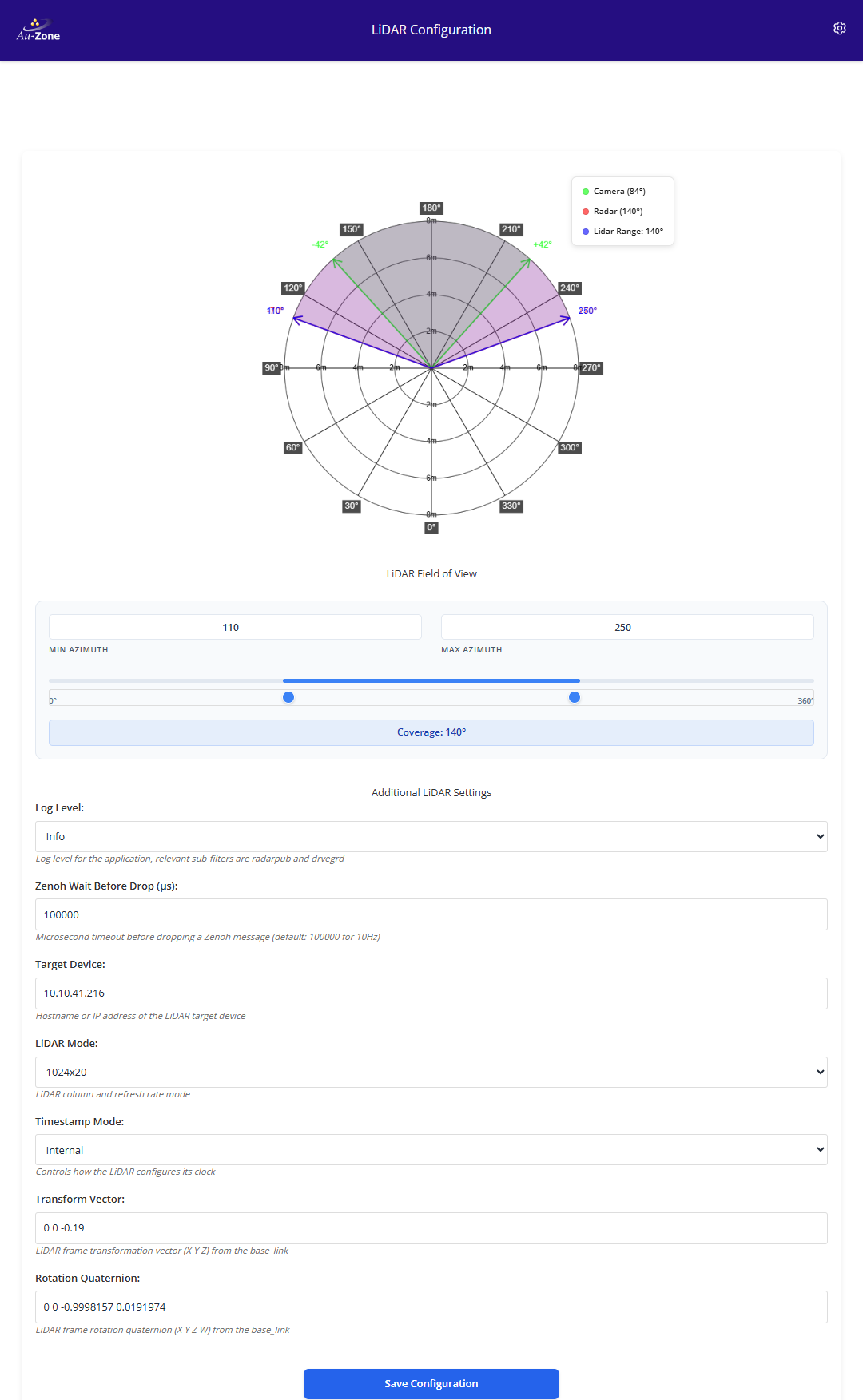
Defines the LiDAR frame transformation from the base_link frame, published on tf_static. Stored as TF_VEC (X Y Z translation in meters) and TF_QUAT (X Y Z W rotation quaternion). The shipped defaults are for the Maivin with the Robosense E1R, 0.1 0 -0.05 and -0.0086497 0.0088020 -0.0086497 0.9998864. For the Ouster with the Au-Zone mounting kit use 0 0 -0.19 and 0 0 -0.9998157 0.0191974, the Ouster 0 degree point is at the rear connector so a 180 degree rotation about Z is needed.
The frame identifiers are stored as BASE_FRAME_ID (base_link) and FRAME_ID (lidar). The base topic for the LiDAR topics is stored as LIDAR_TOPIC with a default of lidar.
Mirror
Mirror the point cloud output when the sensor's native frame does not match the expected orientation. Stored as MIRROR, accepted values are empty (disabled), horizontal (negate Y), vertical (negate Z), and both.
Clustering
The LiDAR service can cluster the point cloud into the lidar/clusters topic which the fusion service uses to build 3D bounding boxes.
| Key | Default | Description |
|---|---|---|
CLUSTERING |
Clustering algorithm, empty disables clustering. dbscan is the most accurate but slower, voxel connected-component clustering is about five times faster but coarser |
|
CLUSTERING_EPS |
200 |
Distance threshold in millimeters, the DBSCAN neighbor radius or the voxel cell size. Typical range 150 to 300 |
CLUSTERING_MINPTS |
4 |
Minimum number of points to form a cluster |
CLUSTERING_BRIDGE |
0 |
Minimum neighbors for a point to expand a cluster, higher values stop thin structures such as railings from merging separate objects. 0 uses the minimum points value |
Ground Filter
The IMU-guided ground plane filter removes floor points before clustering which prevents nearby objects from being merged through shared floor points. It requires IMU data from the sensor, which the Robosense E1R provides.
| Key | Default | Description |
|---|---|---|
GROUND_FILTER |
false |
Enable ground plane removal |
GROUND_THICKNESS |
150 |
Ground slab thickness in millimeters, points within this distance above the detected plane are removed |
SENSOR_HEIGHT |
Known sensor height above the ground in millimeters, skips the automatic plane detection when set |
Ouster Settings
The following settings apply when the sensor type is ouster.
Azimuth
Azimuth field of view as start and stop angles in degrees, the 0 degree point is the rear connector of the Ouster. Stored as AZIMUTH with a default of 0 360. Narrowing the field of view reduces the computational load, the settings page provides a coverage slider for adjusting the angles.
LiDAR Mode
Configures the LiDAR's column resolution and refresh rate. The format is COLxHZ, valid values are 512x10, 1024x10, 2048x10, 512x20, and 1024x20. For example, 1024x20 means 1024 points per rotation at a 20 Hz refresh rate. Stored as LIDAR_MODE with a default of 1024x10.
Timestamp Mode
Controls how the LiDAR configures its clock. Stored as TIMESTAMP_MODE.
- internal: Uses the LiDAR's internal clock (default)
- ptp1588: Synchronizes to a PTP master, the Raivin runs a PTP grandmaster on its sensor Ethernet port
Robosense E1R Settings
The following settings apply when the sensor type is robosense.
| Key | Default | Description |
|---|---|---|
MSOP_PORT |
6699 |
Main data stream UDP port |
DIFOP_PORT |
7788 |
Device information UDP port which also carries the IMU data used by the ground filter |
INCLUDE_NOISY |
false |
Include points flagged as noisy by the sensor |
DISCOVER |
false |
Discover Robosense sensors on the network, print their information, and exit. Useful for initial setup |
Note
The Zenoh Wait Before Drop field on the settings page maps to a timeout used by earlier LiDAR service releases and is not used by the current service.