Recorder Settings
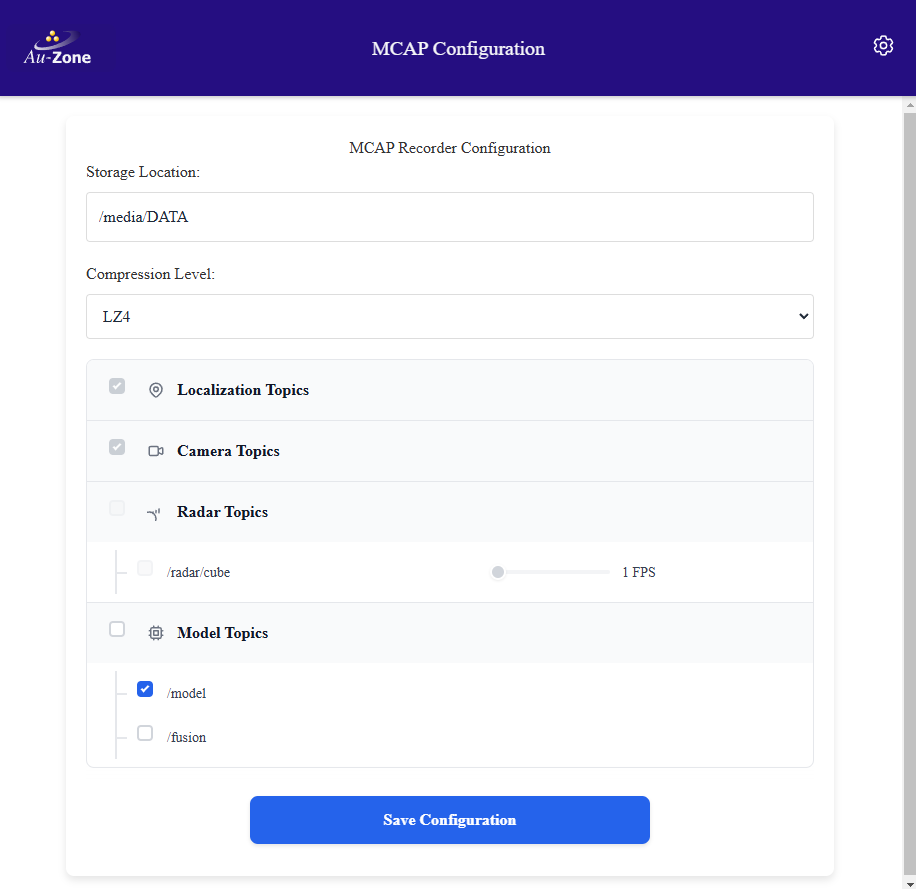
This page configures how sensor and processed outputs are saved by the MCAP Recording Service.
Tip
These values are stored in the /etc/default/recorder file on the device and can be hand-edited.
Storage Location
This controls the storage location for the MCAP recordings. Stored as STORAGE, the directory is created automatically when it does not exist. The recorder service runs as the torizon user and defaults to $HOME/recordings, which resolves to /home/torizon/recordings. If using an SD card this should point to /media/DATA or be adjusted for the SD card mount point.
Compression
This controls the MCAP compression algorithm. Compression will impact the CPU usage compared to no compression but can have significant benefits to MCAP size. It is most impactful when recording the radar/cube or model/output topics with segmentation masks. Stored as COMPRESSION, options are none, lz4, and zstd with a default of lz4. The LZ4 compression is faster while ZSTD provides better compression. No compression is the fastest but creates files up to 3x larger.
Duration
Stored as DURATION, the maximum recording duration in seconds after which the recorder stops automatically. Leave empty for unlimited recording, the recorder then runs until stopped from the Web UI recording button or the service is stopped.
Topics Recorded
Stored as TOPICS, a space-separated list of topics to record. When the list is empty, the default, the recorder discovers every topic currently published on the device and records all of them. Topic names are written relative to the device hostname namespace, for example camera/h264, and are recorded in the MCAP file as /camera/h264.
The Recorder Settings page lists the topics published by the stock services grouped by service and lets the user enable or disable optional topics. Saving the page writes the selected topics to the TOPICS setting.
- Localization topics:
- /tf_static: The static transforms between the sensor frames published by the camera, radar, and LiDAR services.
- /gps: The GPS topic that includes latitude, longitude, elevation, etc.
- /imu: The IMU sensor orientation, angular velocity, and linear acceleration.
- Camera topics:
- /camera/info: The camera intrinsic parameters.
- /camera/h264: The H.264 encoded video from the camera.
- /camera/jpeg: JPEG frames when JPEG streaming is enabled.
- Model topics:
- /model/info: Information about the model being run.
- /model/output: The detection boxes, segmentation masks, tracks, and timing published by the model service.
- Radar topics (Raivin only):
- /radar/info: The radar configuration.
- /radar/targets: The radar point cloud.
- /radar/clusters: The clustered radar point cloud when clustering is enabled.
- /radar/cube: The raw radar cube when cube streaming is enabled.
- Fusion topics (Raivin only):
- /fusion/radar: The radar point cloud annotated with the vision classes and instances.
- /fusion/lidar: The LiDAR point cloud annotated with the vision classes and instances.
- /fusion/occupancy: The occupancy grid of the detected objects.
Note
The camera/frame topic carries the zero-copy camera frames shared between services on the device and is not recorded, the camera pixels are recorded from the H.264 stream.
Radar Cube FPS (Raivin Only)
The raw radar cube can be a lot of data. Stored as CUBE_FPS, this limits the radar cube frame rate recorded to reduce the recording size, leave empty to record at the native publish rate. While the camera topic is encoded with H.264 which makes use of keyframes to significantly reduce the topic size, no such compression is available for the radar cube which means only the compression setting applies. While capturing datasets, the full 18 FPS is typically not required and it is recommended to set this parameter to 1 to 5 FPS to reduce the MCAP size.
Caveats
There are several settings that will stop or change specific topics, which may result in the topic not being recorded.
- On the Model Settings page:
- Enabling Visualization will create the
model/visualizationtopic. - Re-enabling the legacy topics will create the
model/boxes2dormodel/masktopics.
- Enabling Visualization will create the
- On the Camera Settings page:
- Enabling 4K tiling will create the
camera/h264/tl,camera/h264/tr,camera/h264/bl, andcamera/h264/brtopics. - Disabling H264 streaming will stop the
camera/h264topic. - Enabling JPEG streaming will create the
camera/jpegtopic.
- Enabling 4K tiling will create the
When the TOPICS setting is empty every published topic is recorded, including the ones created by the changes above. When the topics were selected explicitly on the Recorder Settings page, newly created topics are not recorded until they are added to the TOPICS setting.
Adding Topics Manually to the Recording Service
Topics that are not listed on the Recorder Settings page can be added manually at the platform command-line interface. You will need to SSH into the platform and edit the TOPICS line in the /etc/default/recorder configuration file with the sudo vi /etc/default/recorder command.
Tip
If you are unfamiliar with vi, please read a quick tutorial.
To record only a specific set of topics, list them as space-separated items. For example, to record the localization, camera, model, and 4K tile topics:
TOPICS="tf_static imu gps camera/info camera/h264/tl camera/h264/tr camera/h264/bl camera/h264/br model/info model/output"
Clear the setting to return to recording every published topic.
TOPICS=""
Restart the recorder from the Web UI recording button for the change to take effect.