Radar Settings (Raivin-only)
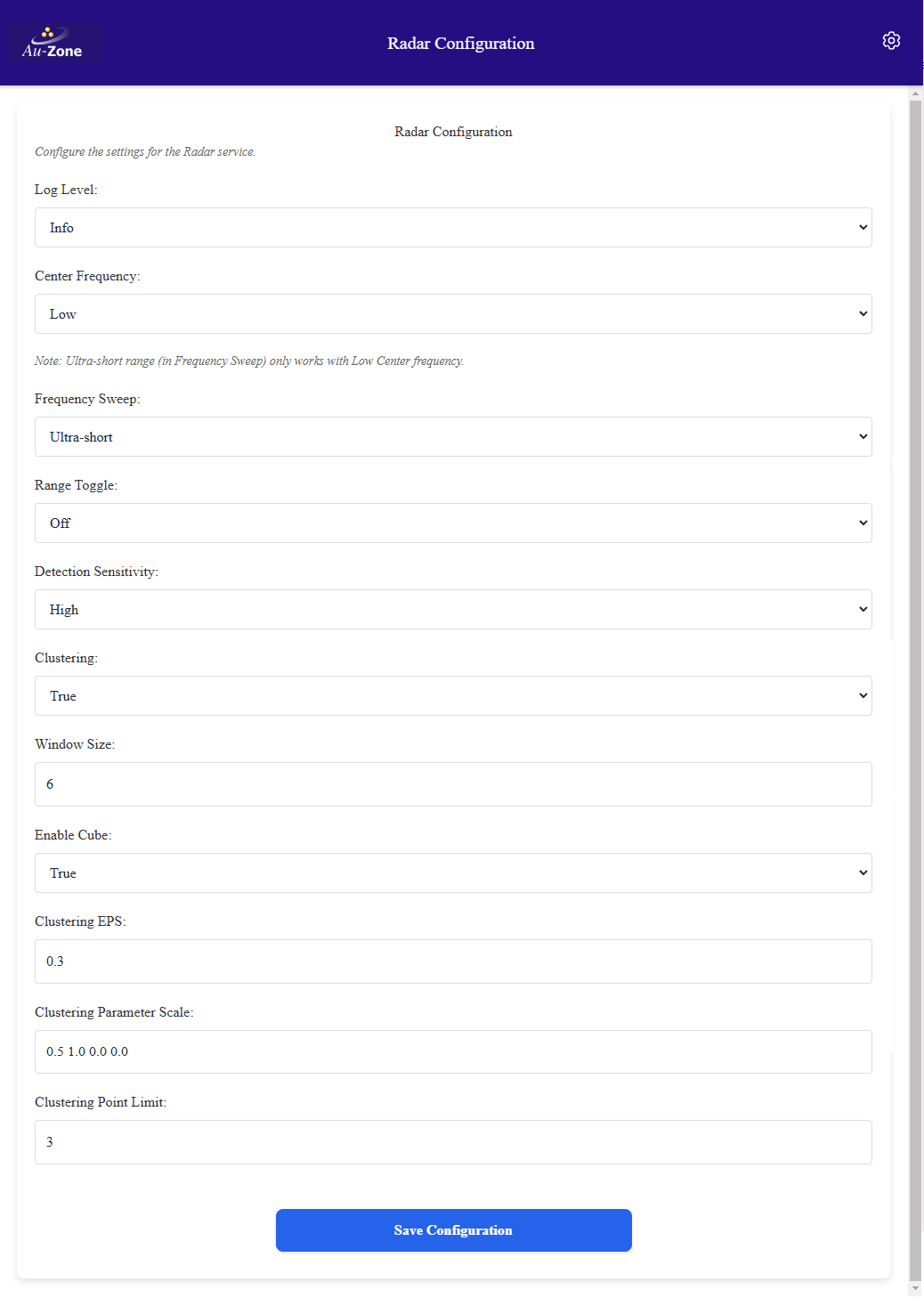
This page configures the radar publishing service that interacts with the Raivin's integrated DRVEGRD-169 radar module from smartmicro. With the exception of the frequency sweep and clustering options, it is not recommended that you change these settings.
Tip
These values are stored in the /etc/default/radarpub file on the device and can be hand-edited. The Web UI exposes the radar and clustering settings, the transform and topic keys described below are only available in the file.
Log Level
Log level for the application, relevant sub-filters are radarpub and drvegrd, refer to the RUST_LOG documentation for details. Stored as RUST_LOG with a default of info.
Center Frequency
Radar center frequency band. The low option is required when using the ultra-short frequency sweep option. Options are low, medium, and high. Stored as CENTER_FREQUENCY, the Raivin default is low.
Frequency Sweep
The frequency sweep controls the detection range of the radar. The following breakdown gives a general range at which a vehicle-type object should be detected.
- ultra-short: 9m (requires the low center frequency)
- short: 19m
- medium: 56m
- long: 130m
Stored as FREQUENCY_SWEEP, the Raivin default is ultra-short which matches the shipped EdgeFirst Fusion Models.
Note
Ultra-short range (in Frequency Sweep) only works with the low center frequency.
Range Toggle
The range-toggle mode allows the radar to alternate between two frequency sweep configurations. Applications must handle range toggling as targets will not be consistent between messages as the frequency alternates.
Warning
The radar cube model does NOT currently handle alternating frequencies as it requires the dataset to be captured at a specific frequency sweep configuration.
Options are off, short-medium, short-long, medium-long, long-ultra-short, medium-ultra-short, and short-ultra-short. Stored as RANGE_TOGGLE with a default of off.
Detection Sensitivity
The detection sensitivity only affects the radar target list (point cloud) and controls the sensitivity to recognize a target. The default is medium, the low and high sensitivity options will result in less and more targets, respectively. Stored as DETECTION_SENSITIVITY.
Enable Cube
Enable streaming the low-level radar cube on the radar/cube topic. This can be used by the low-level radar fusion model or to record MCAP files for the purpose of training this model. The radar cube capture consumes approximately 240 Mbps of bandwidth over the private Raivin Ethernet connection and approximately 75% of one of the CPU cores, enable it when required but otherwise it should be left disabled. Stored as CUBE with a default of false.
Clustering Options
The following settings enable and configure clustering the radar targets.
Clustering
Enable clustering the radar targets into the radar/clusters topic using the Density-Based Spatial Clustering of Applications with Noise (DBSCAN) algorithm. Stored as CLUSTERING with a default of false.
Window Size
Temporal clustering of the radar targets using the window size. The window size is the number of frames to cluster, each frame representing 55ms. The window clustering is a rolling window so it does not incur any additional latency. Stored as WINDOW_SIZE with a default of 6.
Clustering EPS
The epsilon value to be used for DBSCAN clustering. Higher values mean points further from each other can be clustered together. Stored as CLUSTERING_EPS with a default of 1.
Clustering Parameter Scale
Clustering DBSCAN parameter scaling. Parameter order is x, y, z, speed. Set the appropriate axis to 0 to ignore that axis. The default setting of 1 1 0 0 means that only xy distances are taken into account. Stored as CLUSTERING_PARAM_SCALE.
Clustering Point Limit
The minimum number of points per cluster for DBSCAN clustering, the minimum value is 3. Stored as CLUSTERING_POINT_LIMIT with a default of 5.
Mirror
Mirror the radar detection coordinates to correct for the radar mounting orientation. Stored as MIRROR with a default of false, this setting is only available in the file.
Radar Transform
The radar service publishes the static transform from the platform base_link frame to the radar frame on tf_static. These settings are only available in the file.
| Key | Default | Description |
|---|---|---|
RADAR_TF_VEC |
0 0 0 |
Translation (x y z) in meters from base_link to the radar |
RADAR_TF_QUAT |
0 0 0 1 |
Rotation quaternion (x y z w) from base_link to the radar |
BASE_FRAME_ID |
base_link |
Frame ID of the platform base |
RADAR_FRAME_ID |
radar |
Frame ID of the radar |
The radar topics are published relative to the device hostname namespace.