Middleware Topics
The EdgeFirst Perception Middleware is built on a principle of having modular services handling their specialized tasks. For example the camera service is tasked with configuring the camera source and publishing camera frames, the model service subscribes to the camera service to receive camera frames which are then processed by the model and, in turn, publish the model results. There are numerous such services, some can be run in multiple instances to support multiple camera inputs or multiple parallel models.
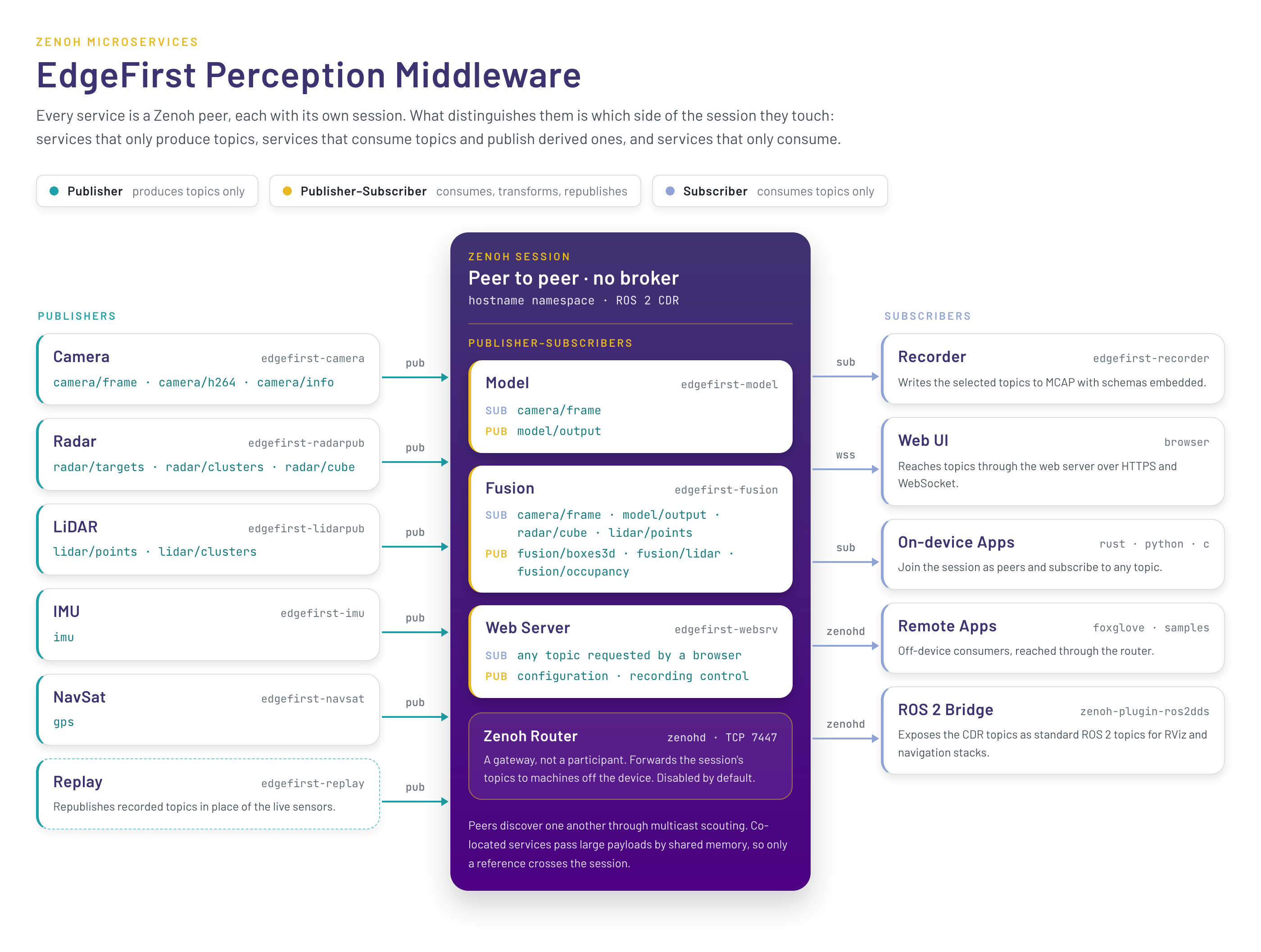
Each service opens its own Zenoh session and joins the others as a peer, so what distinguishes them is which side of the topic space they touch: some only produce topics, some consume topics and publish derived ones, and some only consume. Refer to the Perception Middleware overview for the services and the libraries they are built on.
These middleware applications publish messages and subscribe to messages from other publishers on what is referred to as a topic.
Services will often publish to multiple topics within a namespace, for example the camera service uses the camera namespace
to publish a few topics such as camera/info which publishes information about the camera such as resolution and intrinsic
calibration parameters. The camera service also publishes camera/frame which handles zero-copy of camera frames between
consumers, it can also publish the camera/h264 or camera/jpeg topics for cases where compressed frames are required, such
as when recording or streaming the camera over the network.
Topics are identified by these path-like names and the underlying discovery and network connections to publish and subscribe
over topics is handled by the Zenoh library. Zenoh topics are by default available only on the local device, a service named
zenohd can be run to allow remote connections to the device's topics through a router interface defined as part of the Zenoh
protocol. Messages published over Zenoh support various encodings defined through MIME types. The EdgeFirst Middleware uses
the Common Data Representation (CDR) encoding for messages, this is an open standard encoding and the same used by ROS 2. The
CDR encoding uses schemas to represent each type of message, the EdgeFirst Middleware uses the ROS 2 common interfaces whenever
possible and provides custom schemas when required. The schemas are published on GitHub and we provide premade bindings for
Python, Rust, and C, refer to the API Reference for the message definitions and to Message Schemas
for how the encoding decodes without copying.
Hostname Namespaces
Every EdgeFirst service opens its Zenoh session with the session namespace set to the device hostname. The services publish and
subscribe on bare application keys such as camera/h264, and Zenoh prefixes the namespace so the key on the wire is
{hostname}/camera/h264, for example verdin-imx8mp-15141091/camera/h264. When the hostname is empty or invalid the services fall
back to the localhost namespace.
This convention replaces the rt/ prefix used by earlier releases, which was a legacy of the Zenoh ROS 2 bridge. The namespace keeps
the topics of several devices on the same network apart, avoids cross-talk between devices, and makes recordings from multiple devices
mergeable. It has the following consequences for applications and tools:
- An application running on the device should open its Zenoh session with the namespace set to the hostname and then use the bare topic names, exactly as the services do. This is what the developer examples demonstrate.
- An application running remotely, or subscribing to several devices, can subscribe with a wildcard such as
**/camera/h264orverdin-imx8mp-15141091/camera/h264from a session without a namespace. - The topic names in the service configuration files are written without the hostname, for example
camera/h264. - The Recorder records topics with the hostname stripped, so the channels in an MCAP file are named
/camera/h264,/model/output, and so on. The EdgeFirst Publisher and EdgeFirst Studio also accept recordings from earlier releases carrying thert/prefix or the hostname prefix. - Applications still hard-coded to
rt/...topics do not receive data from the current services.
The Web UI reaches the same topics through the web server, which maps its /api/rt/{topic} WebSocket endpoints to the bare
application keys.
Topic Overview
The following topics are published by the stock services, the pages of this section describe each in detail along with the schemas used. Topics marked optional depend on the service configuration.
| Topic | Schema | Service | Notes |
|---|---|---|---|
camera/frame |
CameraFrame | camera | Zero-copy camera frames, local consumers only |
camera/info |
CameraInfo | camera | Camera intrinsics |
camera/h264 |
CompressedVideo | camera | H.264 video stream |
camera/jpeg |
CompressedImage | camera | Optional JPEG frames |
camera/h264/{tl,tr,bl,br} |
CompressedVideo | camera | Optional 4K tiles |
model/output |
Model | model | Boxes, masks, tracks, and timing |
model/info |
ModelInfo | model | Model name, labels, and tensor shapes |
model/visualization |
ImageAnnotations | model | Optional Foxglove annotations |
model/boxes2d, model/mask |
Detect, Mask | model | Optional legacy topics |
radar/targets, radar/clusters |
PointCloud2 | radarpub | Radar point clouds |
radar/cube |
RadarCube | radarpub | Optional radar data cube |
radar/info |
RadarInfo | radarpub | Radar configuration |
lidar/points, lidar/clusters |
PointCloud2 | lidarpub | LiDAR point clouds |
lidar/imu |
Imu | lidarpub | Angular velocity and acceleration from the LiDAR sensor, where it provides one |
fusion/radar, fusion/lidar |
PointCloud2 | fusion | Points annotated with vision classes |
fusion/occupancy |
PointCloud2 | fusion | Occupancy grid |
fusion/boxes3d |
Detect | fusion | 3D bounding boxes |
fusion/model_output |
Mask | fusion | Optional EdgeFirst Fusion Model output |
imu |
Imu | imu | Orientation and motion |
gps |
NavSatFix | navsat | GPS position |
tf_static |
TransformStamped | camera, radarpub, lidarpub, fusion | Static sensor transforms from base_link |
User applications interface with the EdgeFirst Middleware by subscribing to the appropriate topics. For example, if we need an application to display the camera feed with bounding boxes drawn from the detection model we would write an application which subscribes to the camera and model topics. This application would be responsible for drawing the camera pixels and then drawing the bounding box pixels over the camera and finally displaying the results for the user. We provide a few examples of such applications, the first you're likely to see is the Web User Interface. Our sample code includes many examples which use the Rerun framework for drawing and demonstrate how to subscribe to topics and how to interpret the results, such as reading bounding boxes and drawing them over the camera feed. You'll see these examples using Rerun for display throughout our examples, but there is no direct connection to Rerun and user applications could use any UI of their choosing.