Camera Settings
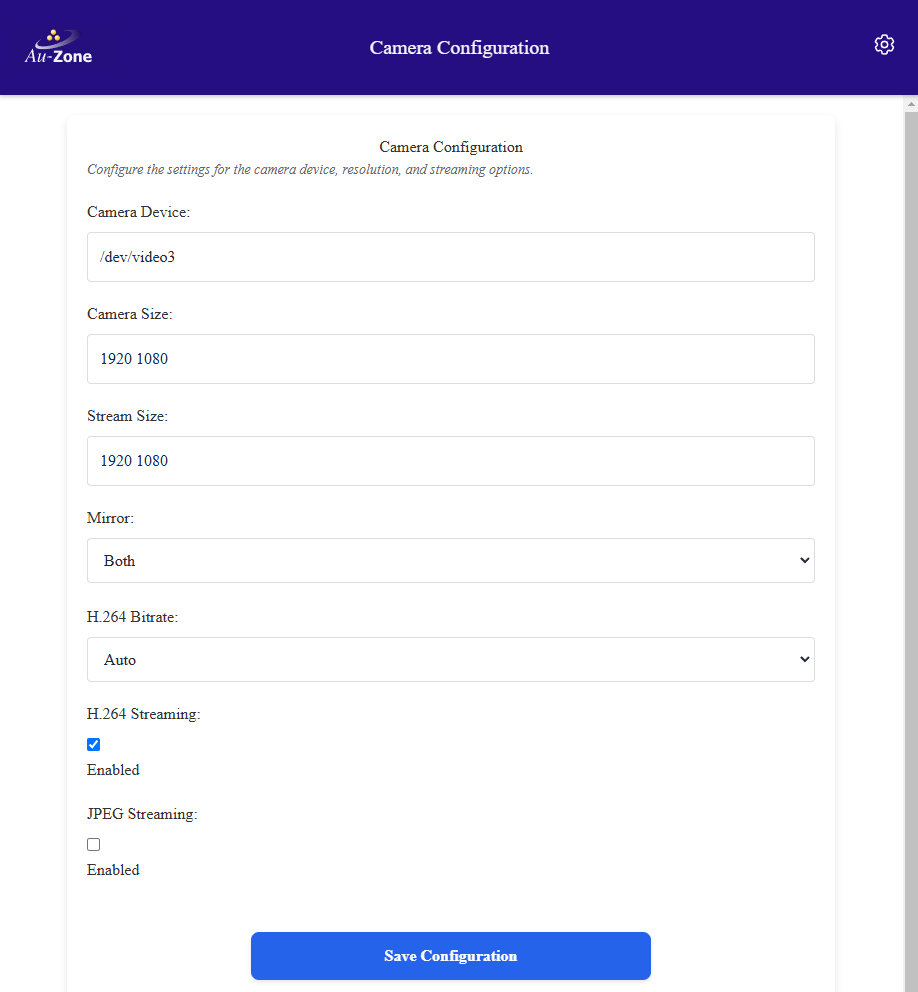
This page configures the camera service that interacts with the Maivin and Raivin's OmniVision OS08A20 image sensor through the i.MX 8M Plus ISP. With the exception of the H.264 bitrate, the camera mode, and the camera and stream sizes, it is not recommended that you change these settings.
Tip
These values are stored in the /etc/default/camera file on the device and can be hand-edited. The Web UI exposes the most common settings, the remaining keys described below are only available in the file.
Camera Device
This configures what camera device the camera service will use, which on Maivin and Raivin is /dev/video3, the ISP output. Stored as CAMERA.
Camera Mode
The camera mode selects the OS08A20 sensor's native readout mode. It is applied by restarting the ISP with the matching sensor configuration before the camera service starts. Stored as CAMERA_MODE, this setting is specific to Maivin and Raivin.
| Mode | Sensor Readout | Frame Rate |
|---|---|---|
1080p60 |
1920x1080, horizontally binned | 60 FPS (default) |
4k |
3840x2160, full resolution | 30 FPS |
The default 1080p60 mode gives better low-light and fast-exposure handling than the full resolution readout and is the mode the shipped model was tuned for. The 4k mode is required for 4K tiled streaming and has known issues in this release. There is no 1080p30 mode.
The camera mode is independent of the camera size below. The ISP downscales from the native readout to the requested camera size but never upscales, so the camera size must not exceed the resolution of the selected mode.
Camera Size
This sets the camera resolution which is used for the camera capture and is separate from the streaming resolution. Stored as CAMERA_SIZE as "width height", the default is 1920 1080. Setting the camera size to 3840 2160 together with the 4k camera mode puts the camera service into 4K Mode.
Stream Size
This configures the streaming resolution for the H.264 and JPEG streaming. Stored as STREAM_SIZE, the default is 1920 1080. The hardware H.264 encoder supports up to HD resolution (1920x1080), a larger camera size is downscaled to the stream size before encoding unless tiling is enabled. A stream size larger than the camera size is rejected at startup. The JPEG stream supports all resolutions but is encoded on the CPU so the practical limit is around 960x540 or 640x360 to maintain a 16:9 aspect ratio.
Mirror
The camera mirror setting can flip the camera image to match the orientation of the camera. Accepted values are none, horizontal, vertical, and both. Stored as MIRROR, this is set to both as the image sensor is mounted upside-down in the Maivin and Raivin enclosures.
H.264 Streaming
This setting enables or disables the camera/h264 topic. Stored as H264, this is enabled by default. Recording and the Web UI camera view require the H.264 stream.
H.264 Bitrate
Controls the H.264 streaming compression level. The higher the bitrate, the better the quality of the image. The actual bitrate remains variable based on the scene but this value sets the cap. Possible values are auto, mbps5, mbps25, mbps50, and mbps100. Stored as H264_BITRATE, the auto setting selects a bitrate from the stream resolution and is about 10 Mbps at 1080p. This also impacts MCAP recording size.
H.264 4K Tiling
When the camera captures at 4K the hardware encoder is limited to 1080p. Enabling tiles splits each 4K frame into four 1080p quadrants encoded independently and published on the camera/h264/tl, camera/h264/tr, camera/h264/bl, and camera/h264/br topics. These settings are only available in the configuration file, refer to The 4K Camera Service.
| Key | Default | Description |
|---|---|---|
H264_TILES |
false |
Enable the four tile streams |
H264_TILES_FPS |
15 |
Frame rate limit applied to the tile streams, 0 means no limit |
H264_TILES_TOPICS |
camera/h264/tl camera/h264/tr camera/h264/bl camera/h264/br |
The four tile topics in top-left, top-right, bottom-left, bottom-right order |
JPEG Streaming
This setting enables or disables the camera/jpeg topic. Stored as JPEG, this is disabled by default. Enabling this will result in higher system utilization and larger MCAP files but will provide JPEG screen captures from the camera service. The JPEG quality is stored as JPEG_QUALITY with a default of 85, quality is a weak lever on CPU usage so reduce the stream size or disable JPEG if the cost is too high.
Recording and Replay
The camera service can record its live H.264 stream to a raw file and replay such a file in place of the live camera. These settings are only available in the configuration file and are intended for development and reproducible testing.
| Key | Default | Description |
|---|---|---|
RECORD |
Record the live H.264 stream to this file along with a <path>.json sidecar |
|
REPLAY |
Replay a previously recorded .h264 file instead of opening the camera |
|
REPLAY_LOOP |
false |
Loop the replay on end of file |
REPLAY_FPS |
Override the replay frame rate, the sidecar rate is used when empty |
Warning
RECORD writes continuously with no size cap or rotation for as long as the service runs and will fill the filesystem if left set. Clear the setting after a capture session.
Camera Calibration and Transform
The camera service publishes the camera intrinsic parameters on camera/info and the static transform from the base_link frame to the camera optical frame on tf_static.
| Key | Default | Description |
|---|---|---|
CAM_INFO_PATH |
Path to a camera calibration file in the ISP format. Left empty on Maivin, the calibration matching the camera mode is selected automatically from /usr/lib/imx8-isp/dewarp_config/ |
|
CAM_TF_VEC |
0 0 0 |
Translation (x y z) in meters from base_link to the camera optical frame |
CAM_TF_QUAT |
-1 1 -1 1 |
Rotation quaternion (x y z w) from base_link to the camera optical frame |
BASE_FRAME_ID |
base_link |
Frame ID of the platform base |
CAMERA_FRAME_ID |
camera_optical |
Frame ID stamped into every published frame |
If a configured calibration file cannot be loaded the service logs a warning and falls back to built-in defaults, which are nominal for a 1080p sensor and not valid for projection or sensor fusion.
Topics
The topics published by the camera service can be renamed when integrating with a consumer that expects different names. Topic names are relative to the device hostname namespace.
| Key | Default | Schema |
|---|---|---|
FRAME_TOPIC |
camera/frame |
CameraFrame |
INFO_TOPIC |
camera/info |
CameraInfo |
H264_TOPIC |
camera/h264 |
CompressedVideo |
JPEG_TOPIC |
camera/jpeg |
CompressedImage |