TFLite Converter
The TFLite Converter is the EdgeFirst reference quantizer. It takes a TensorFlow SavedModel exported from an EdgeFirst Studio training session and produces a TensorFlow Lite flatbuffer that can be deployed on any TFLite-compatible runtime — including the NXP i.MX 8M Plus (via the OpenVX/VIP8000 delegate), the NXP eIQ Neutron NPUs (via the Neutron Converter downstream stage), Arm CPUs (NEON-accelerated), and the standard TensorFlow Lite delegate set.
INT8 is the recommended deployment precision; float16 and float32 paths exist for cases where INT8 accuracy is not yet acceptable. INT8 conversion applies the EdgeFirst Smart Quantizer — per-scale graph surgery that gives each feature-pyramid endpoint its own independent quantization parameters and lifts the decode operations out of the INT8 datapath onto the runtime side. Calibration is fully automatic from the training session.
Model Zoo — Supported Models & Benchmarks
For the latest supported model list, per-model validation results, and INT8 accuracy benchmarks on i.MX 8M Plus and other TFLite targets, see the EdgeFirst Model Zoo on Hugging Face.
Studio Launch Form
| Field | Values | Default | Meaning |
|---|---|---|---|
quantization_mode |
int8 / float16 / float32 |
int8 |
INT8 = full integer post-training quantization with calibration. FP16 = half-precision weights with no calibration. FP32 = direct pass-through. |
input_dtype |
uint8 / int8 |
uint8 |
INT8-mode only. uint8 matches the zero-copy input path used by most camera pipelines on EdgeFirst targets. |
output_dtype |
int8 / uint8 |
int8 |
INT8-mode only. int8 is the EdgeFirst HAL default. |
split_mode |
smart / logical / combined |
smart |
Controls how detection-head outputs are decomposed for quantization. smart is the production setting; logical and combined are diagnostic. |
split_mode explained
The split_mode field is the most important accuracy lever in this converter — see Smart Quantization for the underlying problem it solves.
smart(default) — Per-scale graph surgery. The converter rebuilds the SavedModel so each FPN-scale endpoint becomes an independent output with its own INT8 scale. The decode operations (distance-to-box arithmetic, per-class activation) run in float on the runtime side after dequantization, and the runtime decoder reassembles the boxes back into the logical[0, 1]-normalized form before handing them to application code. This is the only mode that delivers the Smart Quantizer's accuracy benefit and the only mode users should pick for accuracy-sensitive deployments.logical— Slice-based routing only. The converter splits the concatenated output into named tensors (boxes, scores, mask coefficients), but TFLite propagates the parent concatenation's quantization parameters through the slice — all three children share the same scale and zero-point. This mode provides structural routing convenience but no accuracy improvement overcombined. It exists for integration testing and as a structural fallback.combined— No decomposition. The original concatenated output is quantized as-is with a single shared scale. Use only for debugging or for a baseline comparison.
What You Get
A self-contained .tflite flatbuffer with:
- The compiled TFLite graph (quantized weights, fused operations).
- Embedded EdgeFirst metadata (
edgefirst.json+labels.txt) ZIP-appended to the file. - A
tflite_quantizertraceability block recording the calibration source, sample count, quantizer version, and applied splits. - A compiled
outputs[]array that describes the physical tensor layout and per-tensor quantization parameters for the runtime decoder. Undersmartsplit this describes the per-FPN-stride physical children; the logical view that application code sees ([0, 1]-normalized boxes, per-class scores, mask coefficients) is reassembled at runtime by the HAL.
The artifact can be deployed directly to any platform with a TFLite runtime, or used as the upstream input to the Neutron Converter when targeting NXP i.MX 95 and the wider eIQ Neutron silicon lineup.
Calibration
Calibration is fully automatic. EdgeFirst Studio captures a calibration snapshot from the training dataset and passes it to the converter. There is no calibration step a Studio user needs to perform manually. See Calibration Snapshot for the format, selection algorithm, and converter contract.
Converting Your Model
Once training completes in EdgeFirst Studio:
-
Click on the completed training session.
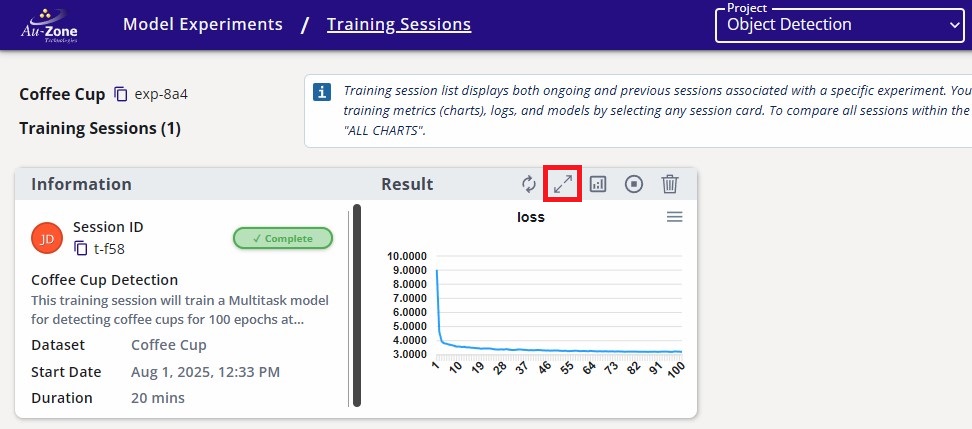
Completed Training Session -
Navigate to the Artifacts tab and click the TFLite Converter button under Converters on the right.
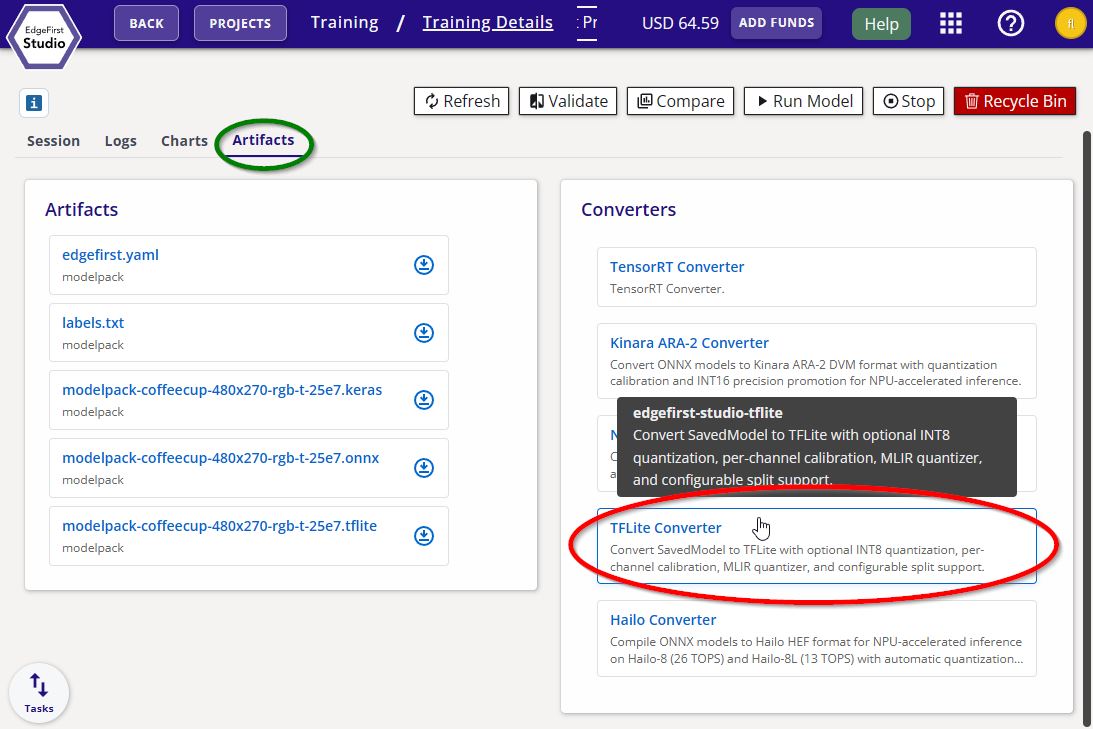
TFLite Converter -
Adjust the quantization mode, I/O precision, and split mode if needed, or leave the defaults for best out-of-the-box performance. Click Start App to begin the conversion.
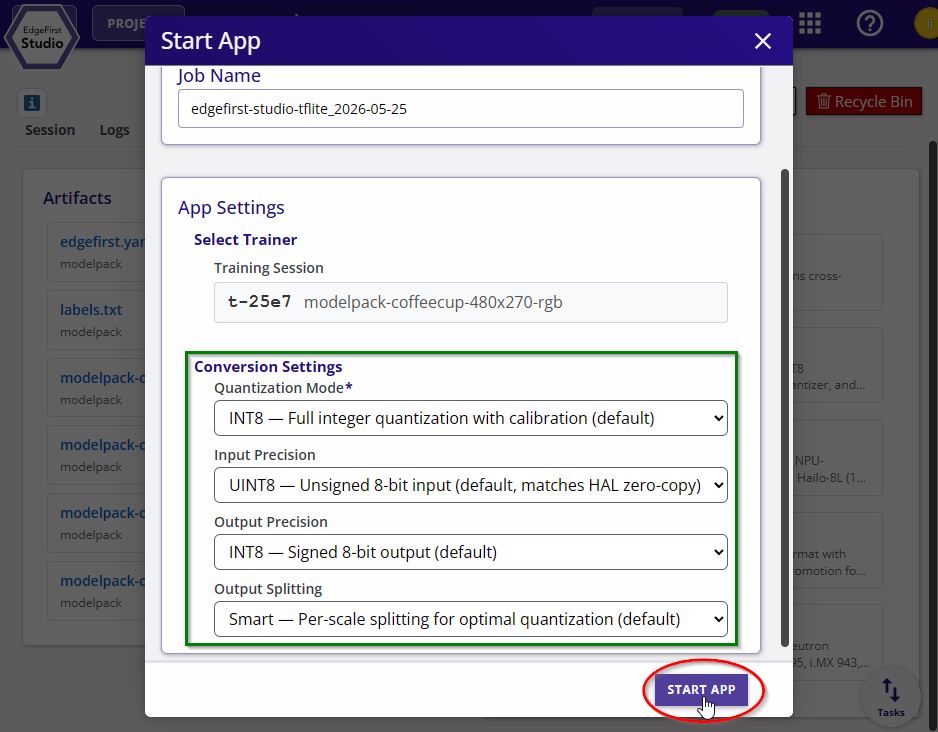
TFLite Converter Options
Reference accuracy numbers for the EdgeFirst-quantized Ultralytics family (YOLOv8n, YOLOv8n-seg, others) are published on the Ultralytics Benchmarks page alongside the float32 baseline they recover from.
Known Limitations
split_mode: logicaldoes not improve INT8 accuracy on TFLite — it is structural routing only. Choosesmartfor accuracy-sensitive INT8 work, orcombinedonly as a debugging baseline.split_mode: smartrequires the training session to record per-scale stride information insplit_hints. EdgeFirst Studio trainers always do this; third-party training pipelines that produce SavedModels withoutsplit_hintswill fall back tologicalorcombined.- Float16 and float32 modes do not apply any decomposition;
split_modeis ignored.