Ara2 Converter
The Ara2 Converter compiles an ONNX model exported from an EdgeFirst Studio training session into a Kinara Dataflow Virtual Machine (.dvm) binary that runs on the NXP Ara240 Discrete NPU — formerly the Kinara Ara-2 — found on the EdgeFirst i.MX 8M Plus freedom board and other Ara240-equipped EdgeFirst platforms.
The Ara2 Converter applies Smart Quantization the same way the other INT8 converters do — by cutting the graph upstream of the decode where the trainer's split_hints allow it. What is unique to Ara2 is an additional accuracy lever: the Ara240 DNPU has DRAM and tolerates large output tensors, so the converter can also promote the most quantization-hostile arithmetic inside the detect head from INT8 to INT16 while leaving it inside the quantized graph. INT16 has roughly 256× the headroom of INT8 and is enough to make the distance-to-box decoding stable without lifting it onto the CPU.
Model Zoo — Supported Models & Benchmarks
For the latest supported model list, INT8/INT16 accuracy comparisons, and validation results on the NXP Ara240 DNPU, see the EdgeFirst Model Zoo on Hugging Face.
Studio Launch Form
| Field | Values | Default | Meaning |
|---|---|---|---|
int16_mode |
int8 / int16_smart |
int8 |
The only conversion knob. int8 = standard asymmetric INT8 throughout. int16_smart = INT8 baseline with selective INT16 promotion of the distance-to-box decode arithmetic in the detect head. |
That is the entire user-facing knob set. Output decomposition is decided automatically by the converter based on the trainer's split_hints; the runtime HAL handles the resulting layout transparently via the HAL Decoder Algorithm, so application code is unaffected.
When to use int16_smart
- The default
int8mode is sufficient for most detection workloads — the Ara240 DNPU's asymmetric INT8 quantization, combined with the trainer'ssplit_hints, recovers most of the accuracy that combined-mode INT8 loses on other targets. - Use
int16_smartwhen box localization precision is the limiting factor in deployment quality (small-object detection, tight metric-IoU targets). It selectively promotes the arithmetic nodes inside the distance-to-box decoder to INT16. - The proto-branch nodes that generate instance-segmentation mask coefficients are explicitly excluded from INT16 promotion, so segmentation mask quality is preserved regardless of which
int16_modeyou pick.
What You Get
A self-contained model.dvm Dataflow Virtual Machine binary with:
- The fully quantized model weights and activations (asymmetric INT8, with optional INT16 promotion in the detect head).
- Embedded EdgeFirst metadata (
edgefirst.json+labels.txt) ZIP-appended to the file. - A top-level
ara2traceability block recording the converter version and conversion settings. - A compiled
outputs[]array that the runtime decoder reads to reconstruct the logical view (boxes, scores, mask coefficients, protos).
Deploy directly to any Ara240-equipped EdgeFirst platform; the runtime HAL reads the compiled metadata and dispatches the optimized decoder.
Calibration
Calibration is fully automatic. EdgeFirst Studio captures a calibration snapshot from the training dataset and passes it to the converter along with the ONNX model. There is no calibration step a Studio user needs to perform manually. See Calibration Snapshot for the format, selection algorithm, and converter contract.
Converting Your Model
Once training completes in EdgeFirst Studio:
-
Click on the completed training session.
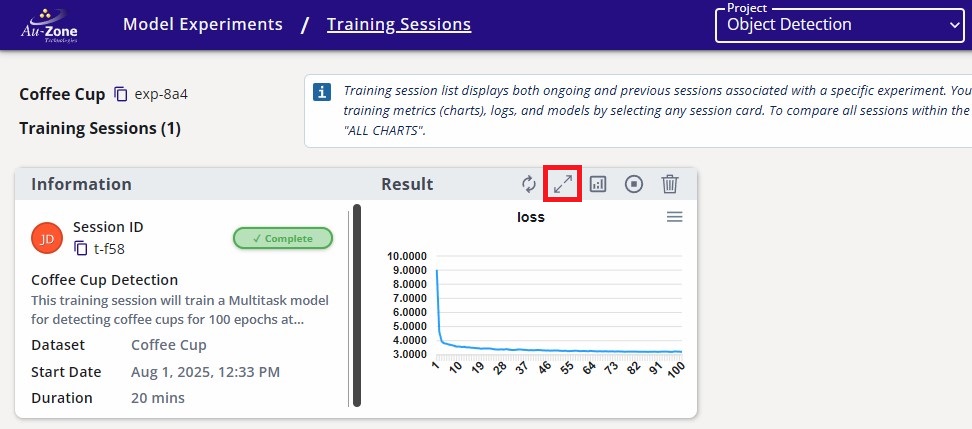
Completed Training Session -
Navigate to the Artifacts tab and click the Ara2 Converter button under Converters on the right.
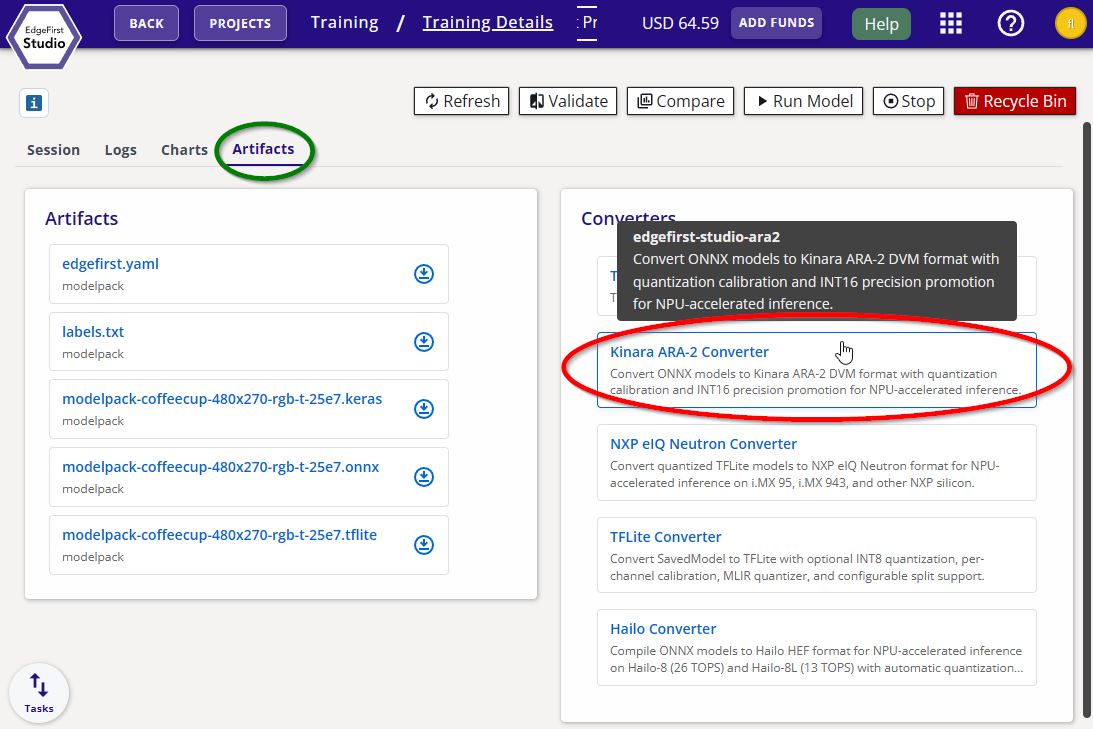
Ara2 Converter -
Pick the precision mode (
int8orint16_smart), then click Start App to begin the conversion.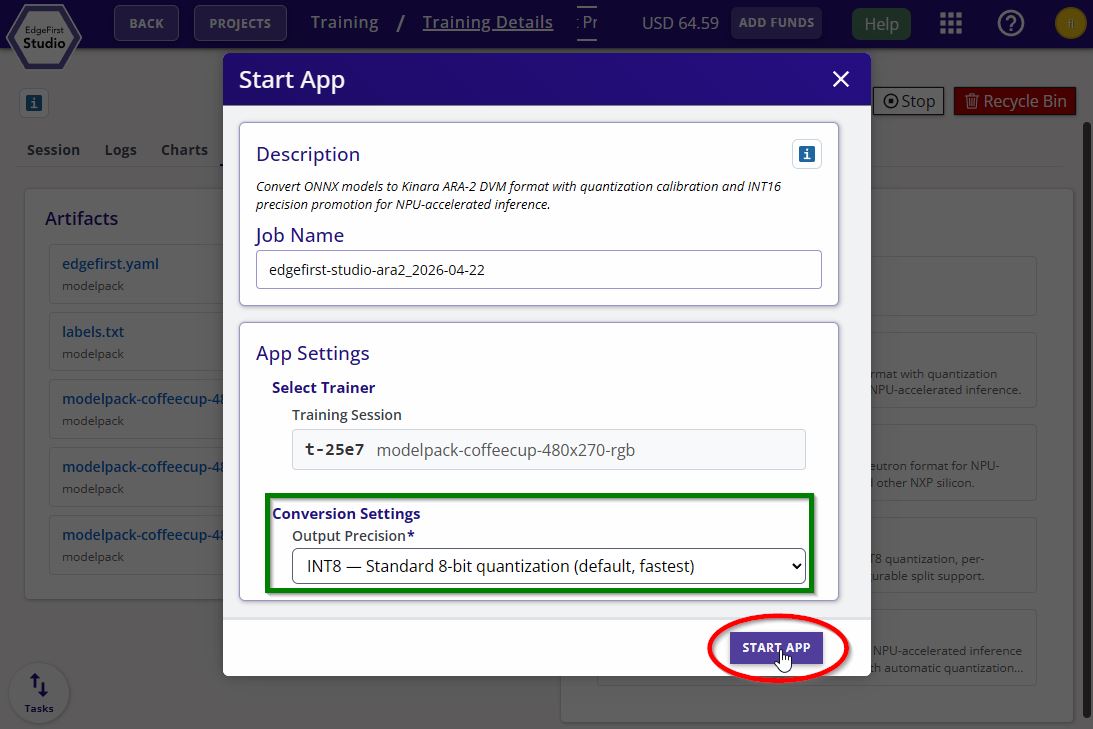
Ara2 Converter Options
Prerequisites
EdgeFirst Studio training sessions produce a ready-to-convert ONNX artifact with the right opset and metadata; nothing extra is required. If you are supplying a manually-exported ONNX from outside Studio, export with opset=13 and simplify=True so the Ara240 toolchain accepts the graph.
Known Limitations
- The
boxes_xy/boxes_whINT16 sub-channel split — the most aggressive per-axis decomposition the Ara240 supports — is not currently exposed in the Studio launch form. - During a successful conversion the underlying toolchain emits a non-fatal
DVMCUT Failed to add model versionlog line. This message is expected and can be ignored.