Model Conversion
Once a model has been trained in EdgeFirst Studio, it is exported in a portable framework-native form — a TensorFlow SavedModel or an ONNX graph. Before that model can run on an embedded NPU, FPGA, or accelerator, it must be converted into the binary format the target runtime expects: a quantized TFLite flatbuffer for NXP i.MX 8M Plus, a .dvm for the NXP Ara240 DNPU, a .hef for Hailo-8 / Hailo-8L, a Neutron-compiled flatbuffer for NXP eIQ Neutron silicon, or a TensorRT engine for NVIDIA Jetson.
EdgeFirst Studio packages this work as Converter Apps. A Converter App is launched directly from a completed training session's Artifacts tab. The app produces a deployment-ready artifact and embeds EdgeFirst model metadata into it so that the runtime can decode the model's outputs without any per-target glue code.
The Conversion Workflow
The same conceptual flow applies to every target:
- Train a model in EdgeFirst Studio — this produces a framework-native artifact (SavedModel or ONNX), an
edgefirst.jsonmetadata document, and a calibration snapshot drawn from the training dataset. - Launch a Converter App from the training session's Artifacts tab and pick the target-appropriate settings on the launch form.
- EdgeFirst Studio runs the conversion as a managed job. The Converter App reads the trainer's metadata (including the
split_hintsblock) and emits a target-specific binary with the compiled output schema, class labels, and full traceability information appended to it. - Download the artifact and deploy it through the EdgeFirst Perception runtime, the platform-specific Launcher, or your own application built on the EdgeFirst HAL.
The compiled artifact is self-describing: application code calls into the runtime and receives {boxes, scores, masks, …} regardless of which converter produced the model or which NPU is executing it. The two-layer output contract that makes this portability possible is described in detail in Model Metadata — Two-Layer Output Model.
Smart Quantization
Most edge NPUs deliver their headline TOPS only when operating on INT8 data. Converting a float32 training graph into a fully quantized INT8 graph is the dominant accuracy decision in the entire pipeline — and the most common failure mode in INT8 deployment is not the per-layer rounding error the literature usually focuses on. It is much simpler than that, and much more catastrophic: a single concatenated output tensor encodes physically different quantities (box coordinates, class probabilities, mask coefficients) that share one INT8 scale.
The mixed-range problem
A trained detection-and-segmentation model wants to ship to an edge NPU as a single quantized graph. The catch is that one output tensor of that graph carries several physically different quantities — bounding-box coordinates, class probabilities, and mask coefficients — packed together along the channel axis. Each of those quantities has its own natural dynamic range: box coordinates and probabilities are bounded, but mask coefficients are not. When a quantizer is forced to pick a single INT8 scale across the whole tensor, that scale is dictated by the widest-range sub-region, and the narrower regions collapse to a handful of usable INT8 codes. The result is that the channel the application cares about most ends up with very little of the available precision.
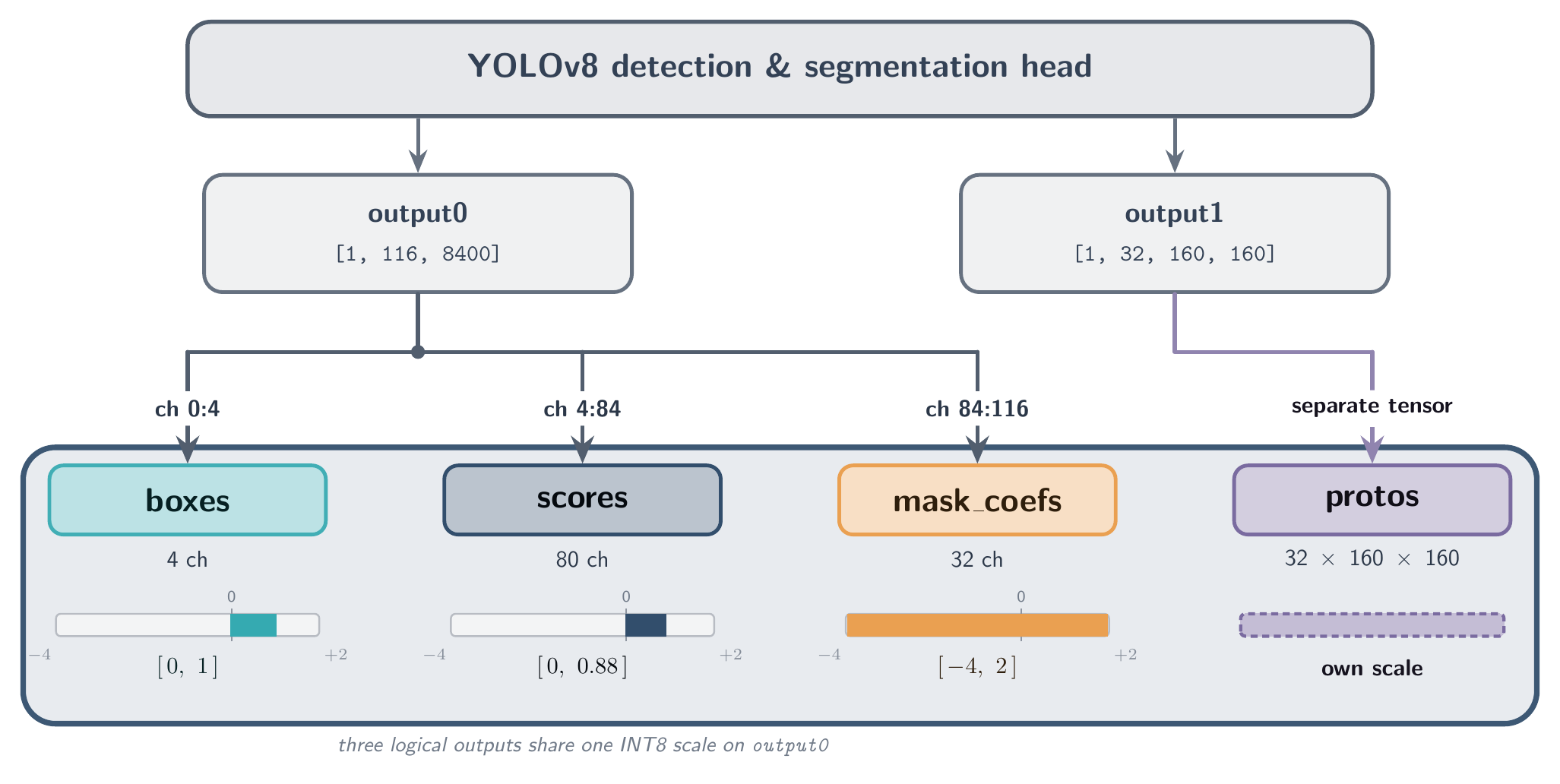
The accuracy hit is compounded by what runs inside the quantized graph. Several operations inside a typical detection head — coordinate decoding, probability-distribution math, per-class activation — are sensitive to integer rounding noise in a way that flat multiplications are not. When the converter does not cut the graph upstream of the head, those operations execute in INT8 on the NPU on the way to producing the combined output, and each one accumulates round-off before the final quantization at the output boundary. The end result is an INT8 deployment that performs unacceptably worse than its float32 baseline — typically a 5%-or-more drop in mAP, sometimes much more.
What Smart Quantization does
The EdgeFirst Smart Quantizer is the family of techniques the Converter Apps apply to recover INT8 accuracy without retraining (no QAT, no model surgery on the user's side). The core idea is straightforward:
- Read the
split_hintsthe trainer recorded in the model's metadata — these declare the logical group boundaries (boxes, scores, mask coefficients) and the natural feature-pyramid scales where the model can be cleanly cut. - Cut the graph upstream of the spatial-merge concatenation so each per-scale endpoint becomes its own output tensor, with its own independently calibrated INT8 scale and zero-point.
- Lift the quantization-hostile decode operations off the NPU into the runtime, where they run in floating point on the CPU after dequantization.
- Record the result in the compiled output schema so the runtime decoder can reassemble the original logical view transparently.
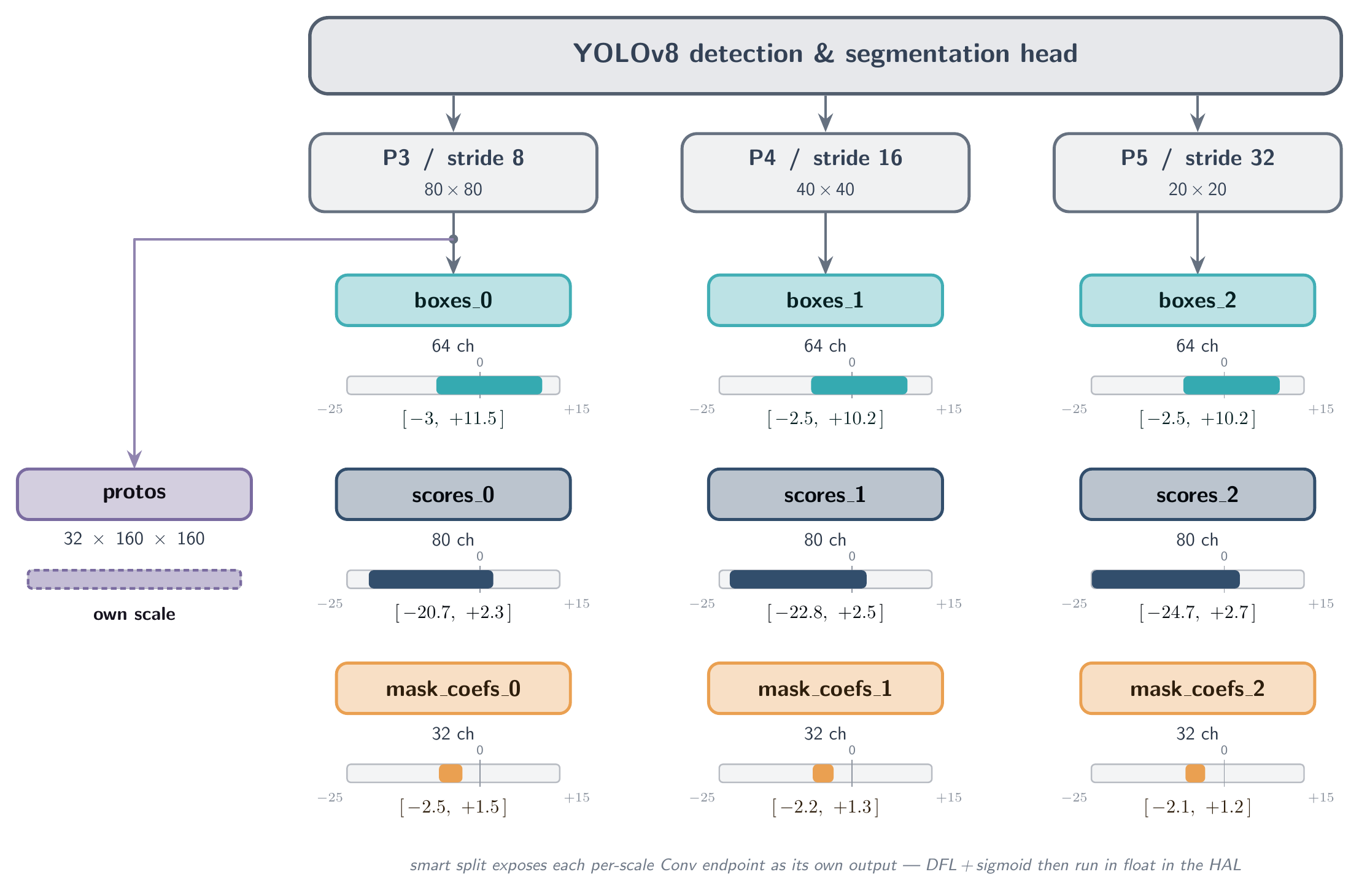
For a typical YOLO-family segmentation head with three FPN scales, the split produces ten physical output buffers in place of the original two. Each child carries its own quantization parameters, and the runtime decoder reads the compiled metadata to dispatch the correct merge strategy — application code is unaffected and still receives a single logical {boxes, scores, masks} result.
The trade-off framing
Smart quantization is not free at runtime — physical splits move per-anchor decode arithmetic onto the CPU, where it shows up as a real (but bounded) cost in the frame budget. Au-Zone's published runtime benchmarks place the optimized decoder in the sub-20 ms range across our supported targets for typical YOLO-family heads, which leaves comfortable headroom for ≥30 FPS end-to-end. The production trade-off:
Smart quantization trades a small, bounded amount of runtime decode work for a large recovery in INT8 accuracy. On every target EdgeFirst ships, the trade is worth taking; on every target EdgeFirst ships, the cost is non-zero.
The published YOLO results that motivated the design — and the calibrated mAP recoveries it delivers across the Ultralytics model family — accompany the EdgeFirst benchmark suite. See Ultralytics Benchmarks for the headline numbers.
Per-Converter Behavior
Not every Converter App implements Smart Quantization the same way; the technique a converter uses is driven by what its target NPU supports.
| Converter | Smart-Quantization technique on this target |
|---|---|
| TFLite Converter | Per-scale graph surgery on the SavedModel. Each per-scale convolution endpoint becomes its own output with an independent INT8 scale. DFL / sigmoid run in float on the HAL. |
| Ara2 Converter | Per-scale split when the trainer supplies stride information, with the option to additionally promote DFL decode arithmetic to INT16 inside the quantized graph. The Ara240 DNPU has DRAM and tolerates large output tensors, so the converter is not forced into a graph cut for hardware reasons — INT16 promotion is the distinctive accuracy lever it can pull on top of decomposition. |
| Hailo Converter | Per-scale graph surgery is structurally required — large concatenated tensors exceed a single hardware context's SRAM. Sigmoid is optionally folded into the output quantization; DFL runs in float on the HAL. |
| Neutron Converter | Quantization is inherited from the upstream TFLite Converter — the Neutron stage is a re-encoder, not a quantizer. Smart split on Neutron also delivers a pipelining win (CPU decode threads run alongside NPU inference). |
| TensorRT Converter | Not applicable — Jetson is an FP16 target today. There is no INT8 quantization step to defeat; the converter bundles the ONNX graph for on-device engine build. |
Available Converter Apps
| Converter | Target hardware | Output format |
|---|---|---|
| TFLite Converter | NXP i.MX 8M Plus (VIP8000), generic CPU/NPU TFLite delegates | .tflite flatbuffer |
| Neutron Converter | NXP i.MX 95, i.MX 943/952, S32N79, MCX N54x/N94x, i.MX RT700, S32K5 | .tflite flatbuffer with Neutron microcode |
| TensorRT Converter | NVIDIA Jetson (Orin Nano Super validated; broader Jetson lineup in progress) | .tensorrt.zip bundle (engine built on-device) |
| Ara2 Converter | NXP Ara240 DNPU | .dvm Dataflow Virtual Machine binary |
| Hailo Converter | Hailo-8 (26 TOPS), Hailo-8L (13 TOPS) | .hef Hailo Executable Format |
Every output artifact has its edgefirst.json and labels.txt appended to it, so the runtime decoder needs nothing beyond the file itself. Picking the right Converter App is mostly a question of which target hardware you intend to deploy on; see the per-converter pages for Studio launch-form specifics, supported model architectures, and known limitations.
Calibration
INT8 quantization requires a representative sample of the input distribution so the converter can measure the activation ranges that determine each tensor's scale. EdgeFirst Studio captures this sample automatically during training as a .safetensors snapshot keyed by dataset ID and parameter hash, and the Converter App downloads it as part of the conversion job. There is no calibration step a Studio user needs to perform manually — the snapshot is reused across models and targets that share a data-preparation pattern, and regenerated only when the dataset or input geometry changes.
The snapshot format, the model-free selection algorithm, the parameter hash, and the producer/consumer contract are documented in Calibration Snapshot.
What's Next
- Read the per-converter pages above for Studio launch-form options, the precise model architectures each converter supports, and any target-specific gotchas.
- The Model Metadata document is the authoritative reference for the
edgefirst.jsonschema, thesplit_hintsblock the trainer writes, the compiledoutputs[]array the converters produce, and the HAL decoder algorithm that consumes it all at runtime. - For end-to-end platform walkthroughs, see the platform Quick Starts — the i.MX 8M Plus, i.MX 95, Jetson, and Raspberry Pi quickstarts each include a model-conversion stage tailored to the target.