Recycle Bin
The Recycle Bin holds items that have been deleted from EdgeFirst Studio. Deleted items are retained here before being permanently purged, giving you the opportunity to restore them if needed. Storage consumed by items in the recycle bin is not released until they are permanently deleted.
To access this page, click the Apps waffle icon in the top navigation bar and select Recycle Bin from the menu.
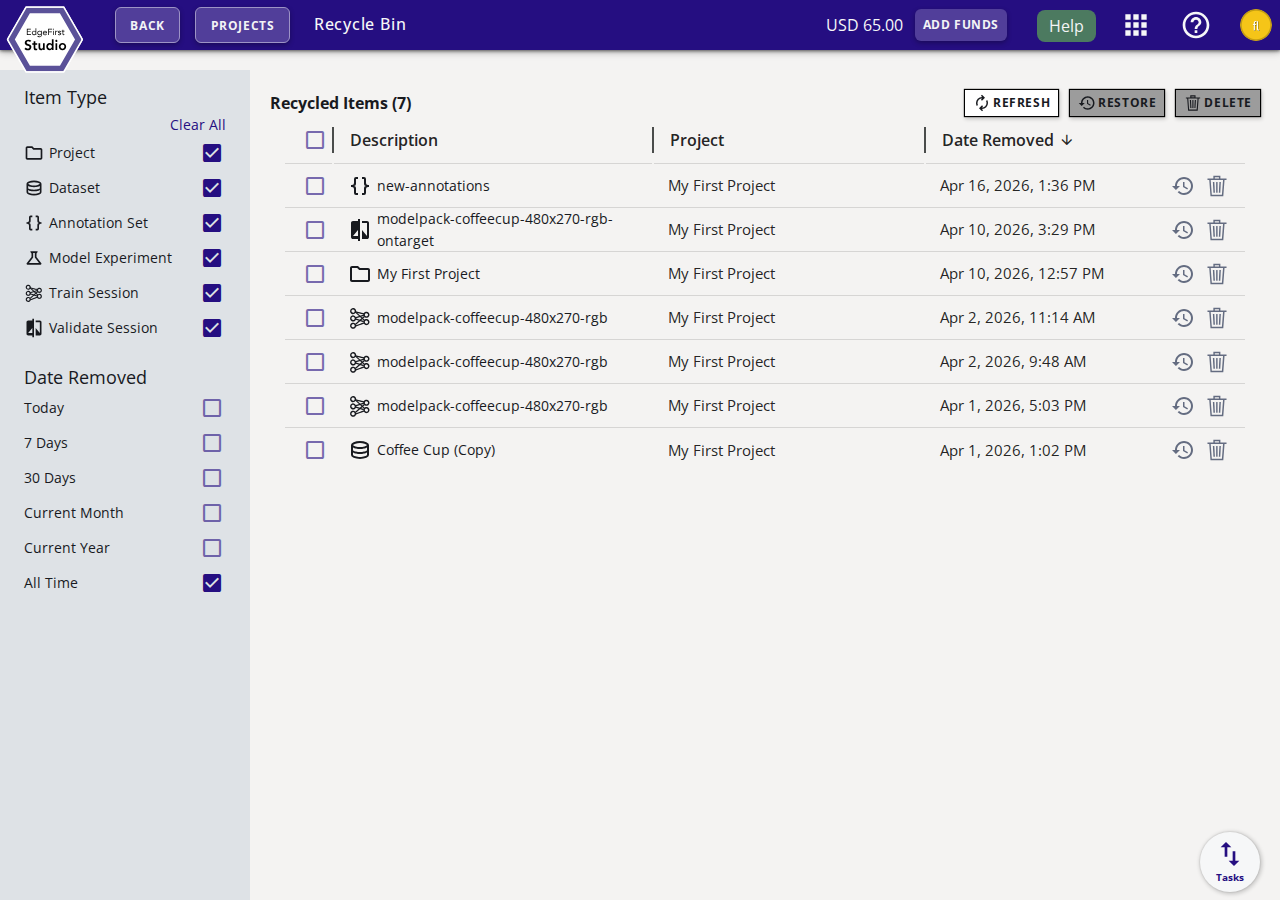
Filter Panel
The left sidebar lets you narrow the items displayed in the table.
Item Type
Filter by the category of the deleted item. All types are shown by default:
- Project
- Dataset
- Annotation Set
- Model Experiment
- Train Session
- Validate Session
Click Clear All to deselect all types, then check only the types you want to see.
Date Removed
Filter by when the item was deleted:
| Option | Description |
|---|---|
| Today | Items deleted today. |
| 7 Days | Items deleted in the last 7 days. |
| 30 Days | Items deleted in the last 30 days. |
| Current Month | Items deleted this calendar month. |
| Current Year | Items deleted this calendar year. |
| All Time | All items regardless of deletion date (default). |
Recycled Items Table
The main table lists all items matching the active filters. The table shows:
| Column | Description |
|---|---|
| Description | The name of the deleted item. Click the name to view its details. |
| Project | The project the item belonged to, if applicable. |
| Date Removed | When the item was moved to the recycle bin. |
Click the column header Date Removed to sort the table ascending or descending.
Actions
Toolbar Actions
Select one or more items using the checkboxes, then use the toolbar buttons:
- Refresh — Reload the recycle bin contents.
- Restore — Recover the selected items back to their original location.
- Delete — Permanently remove the selected items and free their storage.
Row-Level Actions
Each row has two quick-action buttons on the right:
- Restore — Restore this individual item.
- Permanently remove — Permanently delete this individual item immediately.
Permanent Deletion
Permanently deleted items cannot be recovered. Ensure you no longer need an item before purging it. Once purged, the storage it occupied is released and no longer counted against your usage limits or billing.
Next Steps
For information on storage costs, see Billing Information. To manage projects and datasets, see Projects and Datasets Dashboard.