Studio Apps Dashboard
The Studio Apps page is a catalog that lists all available EdgeFirst apps. Apps extend the platform with custom processing pipelines such as data import, model training, conversion, validation, and profiling.
To access this page, click the Apps waffle icon in the top navigation bar and select Apps from the menu.
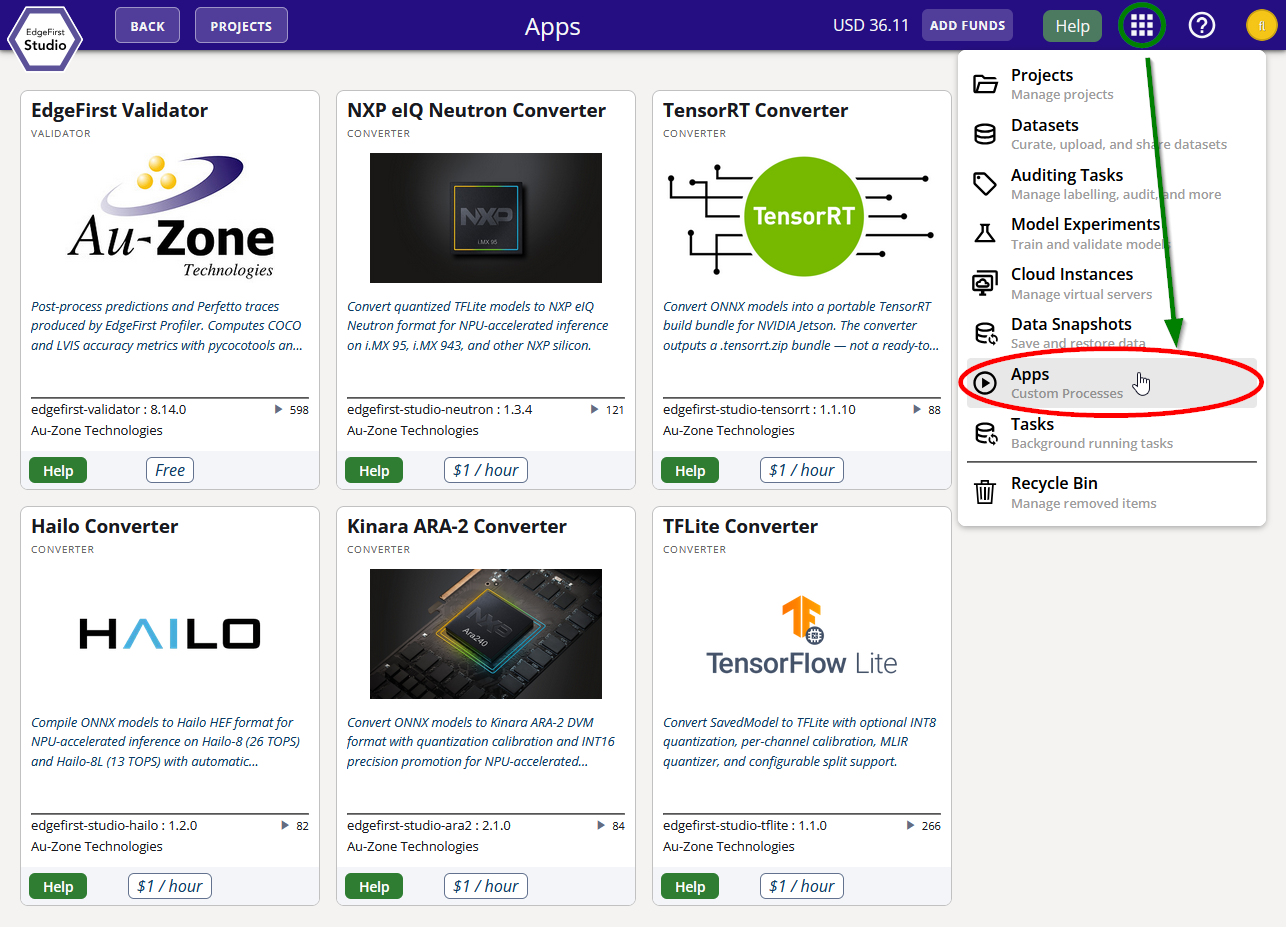
App Cards
Each app is displayed as a card with the following information:
- Name — The display name of the app.
- Description — A brief summary of what the app does.
- Package ID (package field) — The internal package identifier used by the platform.
- Version — The currently published version of the app.
- Author — The organization or individual that published the app.
- Help — A link to the app's full documentation page.
- Runs — The total number of executions recorded for this app across the organization.
- Pricing — The per-hour compute cost, or Free if there is no charge.
Apps are launched from their workflow
The Apps page is a catalog only — apps are not launched from here. Each app is started from the relevant point in its workflow. For example, Converter Apps are launched from a completed training session's Artifacts tab. Once started, the app run is tracked in the Tasks panel.
Available Apps
EdgeFirst Studio ships with the apps described below. Each app is documented in more detail on its own help page, linked from its card and from the sections that follow.
EdgeFirst Profiler
The on-target measurement engine. The Profiler runs the complete vision pipeline — decode, preprocess, inference, postprocess, and NMS — on the target hardware your model will deploy to, then publishes per-image predictions and a detailed timing trace back to EdgeFirst Studio. Studio uses those artifacts to generate the accuracy metrics, timing charts, and trace visualizations for the validation session. See Profiler.
EdgeFirst Validator
The Studio-side companion to the Profiler. The Validator post-processes the predictions and timing traces produced by a profiling run to compute COCO/LVIS accuracy metrics (such as mAP and mIoU) and timing charts, then publishes the results to the validation session. See Validation Metrics.
Converter Apps
Converter Apps turn a completed training session's framework-native artifact (a TensorFlow SavedModel or an ONNX graph) into a deployment-ready binary for a specific target, embedding the EdgeFirst model metadata so the runtime can decode the model's outputs with no per-target glue code. A Converter App is launched from a training session's Artifacts tab. Most converters apply the EdgeFirst Smart Quantizer to recover INT8 accuracy without retraining. For the full conversion workflow, the Smart Quantization mechanism, per-converter behavior, and calibration, see Model Conversion.
TFLite Converter
Converts a SavedModel into a quantized .tflite flatbuffer for NXP i.MX 8M Plus and
generic CPU/NPU TFLite delegates, applying per-scale Smart Quantization. See
TFLite Conversion.
Neutron Converter
Re-encodes a TFLite model with Neutron microcode for NXP i.MX 95 and other NXP eIQ Neutron silicon. See Neutron Conversion.
TensorRT Converter
Bundles an ONNX graph into a .tensorrt.zip for an on-device TensorRT engine build on
NVIDIA Jetson (FP16 path). See TensorRT Conversion.
Ara2 Converter
Converts a model into a .dvm Dataflow Virtual Machine binary for the NXP Ara240 DNPU,
with per-scale split and optional INT16 DFL promotion. See
Ara2 Conversion.
Hailo Converter
Compiles a model into a .hef Hailo Executable Format binary for Hailo-8 and Hailo-8L
NPUs, with structurally-required per-scale Smart Quantization. See
Hailo Conversion.
App Marketplace
The available apps may change as new apps are published. Per-app pricing is shown on each app card and reflected in your billing. Contact support@edgefirst.ai for information on publishing your own apps to the marketplace.
Next Steps
- Model Conversion — the conversion workflow, Smart Quantization, and per-converter launch options.
- Profiler — on-target profiling and validation runs.
- Validation Metrics — how accuracy and timing results are computed and presented.