Training Configurations
The EdgeFirst Model Zoo includes profiling results for Ultralytics YOLO models across multiple versions, architectures, and model sizes. This page provides instructions for configuring EdgeFirst Studio to reproduce and train YOLO models in various formats.
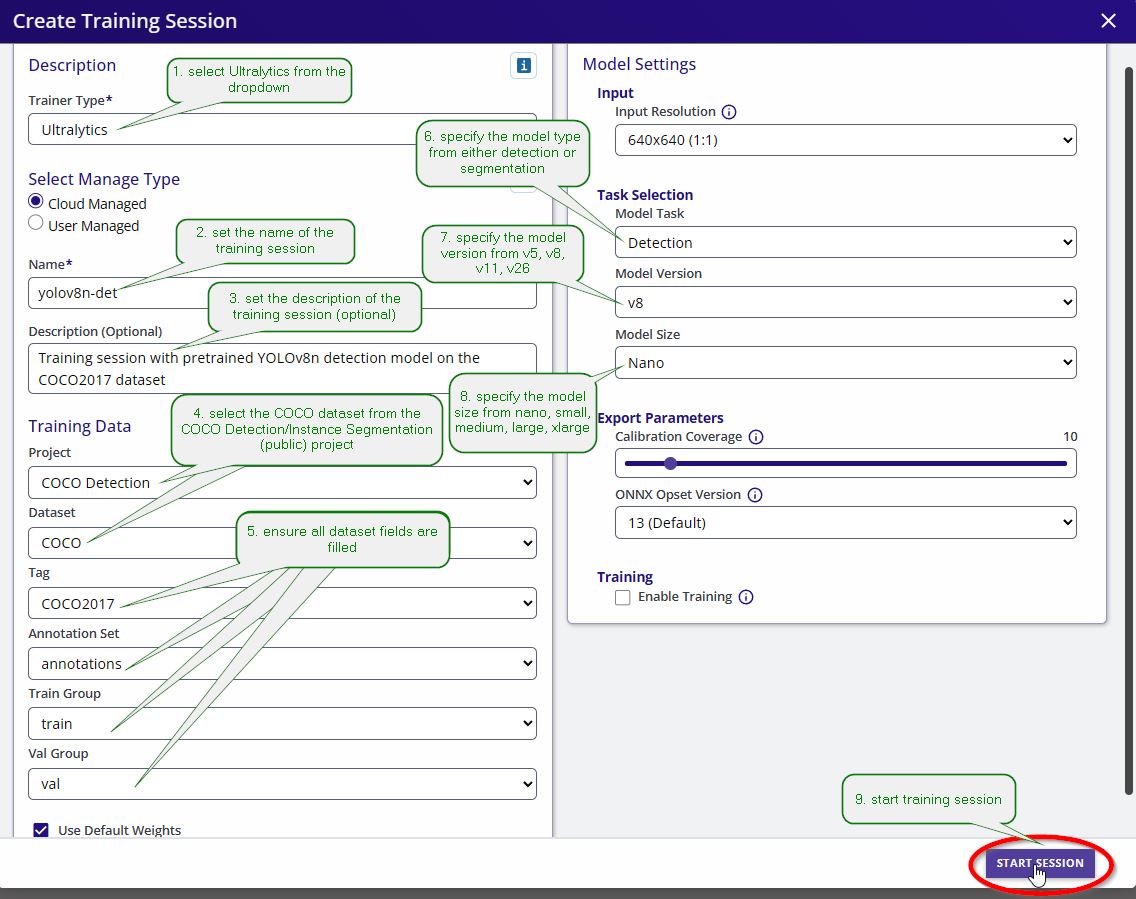
EdgeFirst Studio training sessions allow you to configure the model version, size, and type. Use the table below as a reference when configuring a training session to reproduce a specific model format.
| Model Name | Version | Size | Type |
|---|---|---|---|
| yolov5n-det | v5 | nano | detection |
| yolov5s-det | v5 | small | detection |
| yolov5m-det | v5 | medium | detection |
| yolov8n-det | v8 | nano | detection |
| yolov8s-det | v8 | small | detection |
| yolov8m-det | v8 | medium | detection |
| yolov8n-seg | v8 | nano | segmentation |
| yolov8s-seg | v8 | small | segmentation |
| yolov8m-seg | v8 | medium | segmentation |
| yolo11n-det | v11 | nano | detection |
| yolo11s-det | v11 | small | detection |
| yolo11m-det | v11 | medium | detection |
| yolo11n-seg | v11 | nano | segmentation |
| yolo11s-seg | v11 | small | segmentation |
| yolo11m-seg | v11 | medium | segmentation |
| yolo26n-det | v26 | nano | detection |
| yolo26s-det | v26 | small | detection |
| yolo26m-det | v26 | medium | detection |
| yolo26n-seg | v26 | nano | segmentation |
| yolo26s-seg | v26 | small | segmentation |
| yolo26m-seg | v26 | medium | segmentation |