4K Camera System
Overview
The EdgeFirst Perception Middleware ecosystem provides advanced 4K video processing capabilities through a sophisticated tiling architecture. This document explains how the 4K functionality works, including video capture, processing, encoding, and streaming; it also provides a comprehensive overview of the 4K camera system's architecture and implementation. The tiling approach enables efficient processing and streaming of high-resolution video while maintaining performance and flexibility.
Torizon for Maivin 2026.08
On the Maivin and Raivin the 4K pipeline requires the 4k camera mode which switches the OS08A20 sensor to its full resolution readout at 30 FPS. The 1080p60 capture path is the verified path for the 2026.08.0 release, the 4K tile frame mapping and Foxglove stitching have known issues deferred to a patch release.
This system impacts two specific services:
There are also two add-ons to this system:
Architecture
The architecture of the 4K camera processing can be broken down into four broad sections:
- Camera Capture: Captures 4K video (3840x2160) from the camera device
- Tile Processing: Divides 4K video into 4 separate 1080p tiles
- Parallel Encoding: Each tile is encoded independently using H.264
- Streaming: Tiles are published as separate video streams via Zenoh
The system implements a 2x2 tiling approach where a 4K source (3840x2160) is divided into four 1080p tiles:
- Top Left (1920x1080)
- Top Right (1920x1080)
- Bottom Left (1920x1080)
- Bottom Right (1920x1080)
The Frame Rate is managed with the follow design principles.
- Target Camera FPS: 30 FPS
- Tile FPS: Configurable (default: 15 FPS, 0 for no limit)
- Frame Pacing: Phase locked to the requested tile rate so the measured rate matches the configured rate
- Frame Dropping: Frames arriving while an encoder channel is full are dropped and counted, the drop counters are summarized in the service log every 10 seconds
Camera Capture
- Captures 4K video frames from camera device
- Supports the ISP NV12 output format
- Configurable mirror settings (none, horizontal, vertical, both)
- Target FPS: 30 FPS
Tile Processing
When h264_tiles is enabled:
- Creates 4 separate encoding threads
- Each thread processes one tile position
- Uses bounded channels (capacity: 3) for frame distribution
- Drops and counts frames when channels are full to prevent blocking
Video Encoding
- Direct Encoding: Uses
encode_direct()for efficient processing - Crop Region: Automatically crops the source image to tile dimensions
- H.264 Encoding: Hardware-accelerated encoding using VSL encoder
- Bitrate Control: Configurable bitrate settings (5-100 Mbps)
Streaming Architecture
The four topics are then streamed using Zenoh with each tile has its own Zenoh publisher
Topic Structure
camera/h264/tlcamera/h264/trcamera/h264/blcamera/h264/br
The topics are relative to the device hostname namespace and configurable with the H264_TILES_TOPICS setting.
The system is designed for seamless integration with ROS and Foxglove Studio:
- Foxglove Studio: Can subscribe to individual tile topics
- Multi-View Layout: Display all 4 tiles simultaneously
- Synchronized Playback: All tiles share the same timestamp
- Independent Control: Each tile can be controlled separately
Implementation Details
The following below are snippets of the Rust code to provide context and clarity for the 4K camera implementation.
Tile Position Enum
Each tile position defines:
- Crop Parameters: Source coordinates and dimensions for cropping
- Output Dimensions: Fixed at 1920x1080 for each tile
enum TilePosition {
    TopLeft,
    TopRight,
    BottomLeft,
    BottomRight,
}
Crop Calculation
The get_crop_params() method calculates the source region for each tile:
fn get_crop_params(&self, source_width: u32, source_height: u32) -> (u32, u32, u32, u32) {
    let source_tile_width = source_width / 2;
    let source_tile_height = source_height / 2;

    match self {
        TilePosition::TopLeft => (0, 0, source_tile_width, source_tile_height),
        TilePosition::TopRight => (source_tile_width, 0, source_tile_width, source_tile_height),
        TilePosition::BottomLeft => (0, source_tile_height, source_tile_width, source_tile_height),
        TilePosition::BottomRight => (source_tile_width, source_tile_height, source_tile_width, source_tile_height),
    }
}
VideoManager with Crop Support
Each video stream is individually managed based on size, crop rectangle, bitrate, and target FPS.
VideoManager::new_with_crop(
    FourCC(*b"H264"),
    output_width: i32,      // 1920
    output_height: i32,     // 1080
    crop_rect: (x, y, w, h), // Tile-specific crop region
    bitrate: H264Bitrate,
    target_fps: Option<i32>
)
Channel Management
Each frame in every tile stream is sent with the image and timestamp attached.
fn try_send(tx: &Sender<(Image, Timestamp)>, img: Image, ts: Timestamp, _name: &str) {
    match tx.try_send((img, ts)) {
        Ok(_) => {},
        Err(_) => {
            // Count the dropped frame, the counters are reported
            // in a rate-limited log line every 10 seconds
        }
    }
}
Zenoh Message Format
Each tile stream publishes FoxgloveCompressedVideo messages:
FoxgloveCompressedVideo {
    header: Header {
        stamp: Time { sec, nanosec },
        frame_id: "camera_optical_topleft", // Tile-specific frame ID
    },
    format: "h264",
    data: Vec<u8>, // H.264 encoded video data
}
Performance Optimizations
Parallel Processing
- 4 Independent Threads: Each tile processed in separate thread
- Thread Names:
h264_tile_topleft,h264_tile_topright, etc. - Tokio Runtime: Each thread runs its own async runtime
Memory Management
- DMA Buffer Sharing: Efficient zero-copy operations
- Bounded Channels: Prevents memory buildup during slow encoding
- Frame Dropping: Graceful handling of encoding bottlenecks
Hardware Acceleration
- G2D Integration: Hardware-accelerated image processing
- VSL Encoder: Hardware H.264 encoding
- Direct Encoding: Bypasses unnecessary conversions
Dynamic Crop Updates
- Source Size Detection: Monitors camera resolution changes
- Crop Region Updates: Automatically adjusts crop parameters
- Runtime Adaptation: Handles resolution changes without restart
Error Handling
Encoding Errors
- VideoManager Creation: Fails gracefully with detailed error messages
- Encoding Failures: Logged per tile with position information
- Publishing Errors: Individual tile failures don't affect others
Monitoring and Debugging
The camera service reports its tiling work to the Tracy profiler, which attaches from a workstation while the device runs. Refer to Profiling the Middleware for the full workflow, including the profiler version your services require, enabling TRACY in /etc/default/camera, and connecting to the device.
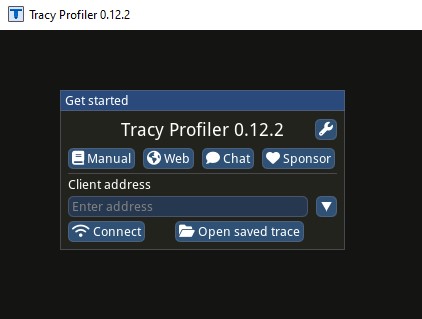
Launching the profiler opens the connection window.
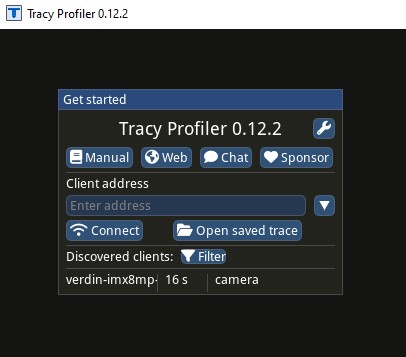
Any service on the device with profiling enabled is discovered and listed, the camera service among them. Selecting it opens the timeline.
With the camera service attached, the tiling paths appear as follows.
- Frame marks for the capture loop, with secondary frames for the
h264andh264_tilepaths - Plots for
fpsandh264_bitrate, giving real-time bitrate and throughput - Zones for the encode stages, including
h264_resize,h264_encode, and the per-tile work
Logging
- Structured Logging: Tile-specific log spans
- Error Tracking: Detailed error messages with context
- Performance Warnings: FPS monitoring and alerts